 Cortex
Hand signatures
Import your handwritten signature from Preview or an image, or draw it with a pointer or a finger on the trackpad.
A hand signature is the stroke drawn into your stamps. Cortex keeps a library of them on this Mac only — another Mac imports or draws them again — and each is registered on purpose, behind Touch ID, so a stamp can never carry a signature that is not yours. Hand signatures have no names: each is its thumbnail. Any of them goes with any sign-as profile.
Add one with Add… under Hand Signatures in Settings → Signing, or in the profile editor:
Import from Preview
Preview keeps its signatures where no other app can read them, so Cortex reads one from a PDF you signed in Preview. Open a Blank Page in Preview opens a page made for it: put your signature on it with Markup → Sign, save it (⌘S), then Read the Saved Page. Or Choose PDF… for any PDF you signed. Cortex shows every signature it finds as a card; click yours (marked MINE), then Add Hand Signature and Touch ID. The others are not kept.
Import from an image
Import from Image… takes a scan, a photo or a PNG of your signature — dark ink on a light, even background, cropped close works best. Cortex traces the ink into an outline and shows it before you add it.
Draw
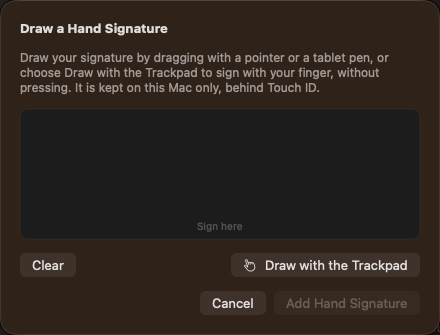
Draw… opens a pad. Drag across it with the pointer or a tablet pen, or choose Draw with the Trackpad to sign with a finger or a stylus on the trackpad without pressing: the middle of the trackpad maps onto the pad, the pointer stays still, and clicks and taps are ignored while you draw. Press any key when you are done. Clear starts again; Add Hand Signature and Touch ID keep it.
Remove one
Hover a thumbnail in Settings → Signing and click its ✕, or use its context menu. A profile that used it falls back to the first hand signature left. Signatures already made keep the stroke they were made with.
Something wrong or missing? Tell us