 Cortex
Decide what an applet may reach
The launcher: one folder, ticked domains, minis, an agent, tools, commands and limits.
What an applet may reach is your choice, made for each installed applet. The settings for one applet are its launcher, which you open with Configure… in the applet's menu. On screen it is always called the applet's configuration.
An applet's manifest asks for what it needs. The launcher grants it. Anything you do not grant is refused when the applet's script tries it, and the run goes on, unless the applet marks that need as required. Then it will not start until you allow it.
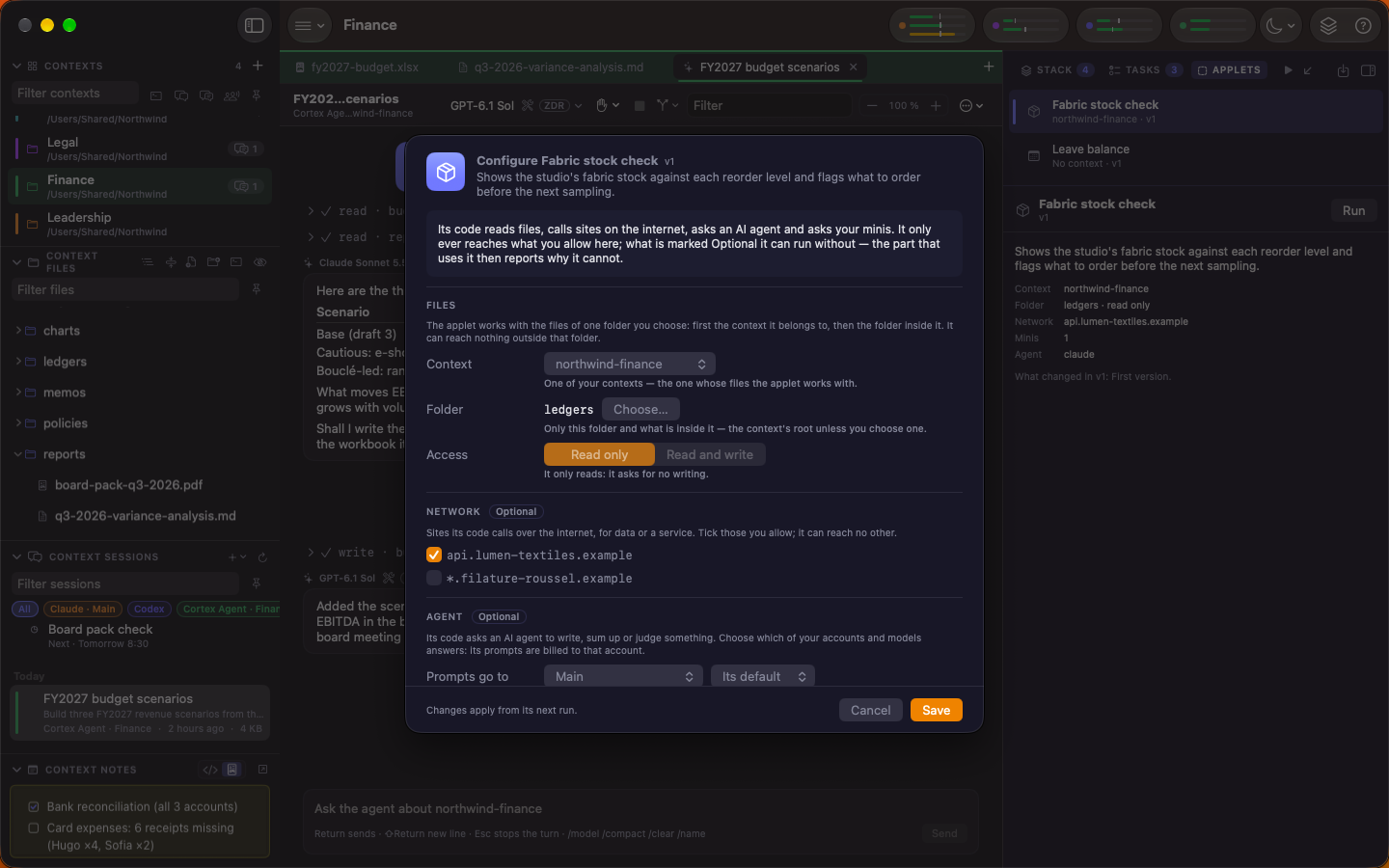
The sheet
At the top you see the applet's icon, name, version and full description. An introduction says in plain words what its code does that needs you. Below it, one section for each thing the applet asks for, and none for what it does not. An applet that asks for nothing reads "It needs nothing from you". Sections the applet can run without are tagged Optional.
| Section | What you decide |
|---|---|
| Files | One context, one folder inside it (the context's root by default), and whether the applet may only read, or also write. It reaches nothing outside that folder, and a link that leads out of it is not followed. |
| Network | Each web domain it asks for, ticked one by one. None are ticked at first, and it cannot add one it did not declare. Only https is used. |
| Agent | The account and model its prompts go to, billed to that account like a session. None by default. |
| Minis | The minis of your library it may ask. None by default. |
| Cortex tools | Each Cortex tool it asks for, ticked one by one. |
| Commands it runs | A card for each command it declares, with a switch. The card shows the command whole, its placeholders and the folders it uses. None are on by default. |
| Limits | How long a handler may take, memory, response size and time, how long a command may run (60 seconds by default, 300 at most) and prompts to the agent per run (20 by default, 100 at most). Defaults resets them. |
Commands are run by Cortex, never through a shell, always inside the OS sandbox with only the folders the command declared open. What you switch on is the command as shown. A later version that changes its arguments or folders runs nothing until you switch it on again, and the card says changed.
First run
An applet whose configuration has never been opened, or whose required needs are not all met, opens the sheet when you press Run. A banner names what it cannot run without. The button reads Save and Run, and stays disabled until every required need is met.
Changes and new versions
Changes apply to the next run. While a run is going, the sheet is read-only.
A new version that declares more, such as another domain, a tool or an agent, grants nothing new. The applet keeps exactly what you ticked, and the list marks it until you look.
What an applet can never do
Every applet can show a notification and write to the clipboard, and there is no switch for either. Its script has no file access of its own, no network and no way to start a process. Everything goes through Cortex. A page it fetches or an agent's answer reaches the script as plain data and is never run.
An applet's data and secrets are removed with Clear Data… in its menu, which asks first.
Every call a script can make, and which ones need what, is in Applet script calls and builder tools. The Cortex tools an applet may call are in the Cortex tools reference.
Something wrong or missing? Tell us