 Cortex
Turn on the OS sandbox
On this page
Settings → Isolation: confine every command, list the tool folders sessions need, per-context folders.
The deny rules Cortex gives Claude Code only cover Claude's file tools. A shell command an agent runs is not bound by them. The OS sandbox closes that gap: it wraps the whole agent process, and everything it starts, in a macOS sandbox. This article is the switch and what it costs.
Turn it on
- Open Settings → Isolation.
- Switch on Run sessions in an OS sandbox.
- Start a new session. The setting is read when a session starts, so sessions already running keep how they started.
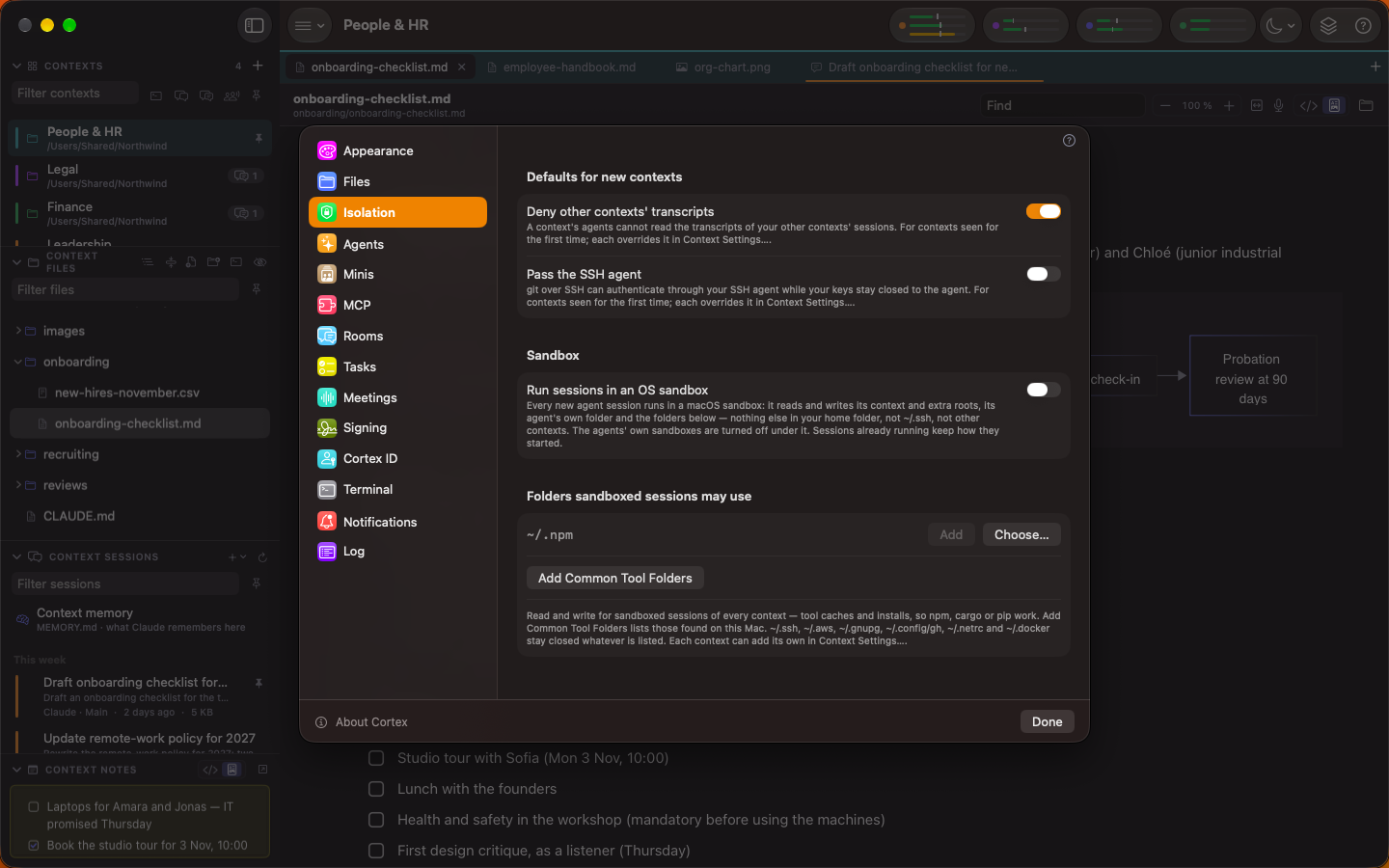
The switch is off by default. The Cortex Agent ignores it and always runs in the sandbox.
What the sandbox does
A session can read and write only:
- its context and its extra roots;
- its agent's own folder, for its settings, sessions and sign-in;
- the folders you list under Folders sandboxed sessions may use;
- the usual system folders, temporary folders and tool installs it needs to run.
Everything else in your home folder is closed to it. Some places stay closed whatever you list: ~/.ssh, ~/.aws, ~/.gnupg, ~/.config/gh, ~/.netrc and ~/.docker. The Keychain can never be written to. Other sessions' working folders are closed too.
Let sessions use your tools
Because home is closed, a command that needs a tool's cache or install there, such as npm, cargo, nvm, pip --user or pyenv, fails unless you list that folder.
- In Settings → Isolation, choose Add Common Tool Folders. It lists the usual tool folders it finds on your Mac, for example
~/.npm,~/.cargo,~/.nvm,~/.cacheand~/go. - Add any other folder by hand under Folders sandboxed sessions may use. Each is a full path, and
~is allowed. A relative path is refused. - For one context only, add folders under Sandbox folders in its Context Settings…. See Context settings.
Listed folders are opened for reading and writing.
What changes when it is on
- Claude Code's and Codex's own sandboxes are turned off. They cannot run inside Cortex's, and Cortex's confines the process instead.
- Their settings are read-only. A session cannot write the agent's settings, hooks, plugins, skills, agents or commands, since every later session would run them. Things like
/config,/permissions, plugin installs and new skills from inside a sandboxed session fail. Do them outside it. - Agent installs are read-only.
brewornpm -gthat touch the agent's own install fail inside a sandboxed session. Update the agent outside one. gitover SSH works only if the context passes the SSH agent. The keys themselves stay closed.- MCP servers added by a session are set aside. If a sandboxed session adds an MCP server to its agent's configuration, Cortex takes it out of the file, tells you, and lists it under MCP servers set aside in Settings → Isolation. Choose Keep to put it back, or Forget.
Defaults and per-context settings
Settings → Isolation also sets the defaults for contexts seen for the first time: Deny other contexts' transcripts (on) and Pass the SSH agent (off). Each context can override them in its Context Settings…. Extra roots are granted exactly as the context's own folder is.
Is it right for you?
Turn it on if agents run commands you do not review, or if you read content you do not trust. Leave it off if you want sessions to behave like your own terminal. You can switch it back at any time, and it takes effect for the next session.
Something wrong or missing? Tell us