 Cortex
The key log: catching a false key
On this page
A public log of every key, co-signed by independent witnesses, checked before Cortex encrypts, monitored for your own.
When you share with someone, Cortex asks the server for their key and locks the share to it. What if the server gave a key that belongs to someone else? The key log is how that leaves evidence. This article explains it without the mathematics. The technical page, Security, has the details.
What the log is
Every public key the server hands out for a Cortex ID, and every Mac's device key, is first written into a public log. So is the signing key of each Mac that signs PDFs, and so is each signature made and each one revoked. The log can only be added to. Nothing is changed or removed afterwards. Anyone can read it, and Cortex and other tools do.
The log holds no address, no name, no Cortex ID and no document in clear. Each entry holds hashes and a time, so a reader learns how many keys and signatures appear and when, not whose or of what. An entry is never removed, so a deleted Cortex ID leaves its hashed entries behind.
What Cortex does with it
- Before it uses a key, Cortex checks that the key is really in the log, that the log's latest head is properly signed and co-signed by the witnesses, that it is less than a day old, and that it follows from the last head Cortex saw. It does this before encrypting a share's key to a recipient, opening what a sender sealed, approving a new Mac, opening a mini's channel, or using a signing key.
- If a check fails, Cortex refuses. The share, the recipient's keys, the approval or the channel stops, with the message "Cortex Server could not prove this key is the one it publishes for them". Cortex then offers a fingerprint comparison.
- It watches your own Cortex ID. On every connection and every hour while connected, Cortex reads what was added to the log and looks for your Cortex ID. If a key appeared that none of your Macs made, a signing key included, or a device that is not one of yours, every Mac of yours shows an alert, such as "A key was added to your Cortex ID on 17 Nov at 14:02 that none of your Macs made", with Reset…. See Rotate or reset your key.
- It compares notes. Cortex passes the latest log head along inside what it already sends, in a share's encrypted description and in the first message of a mini conversation. If two heads cannot both belong to one log, that is a split view: the server showing different logs to different people. Cortex refuses and shows both in Settings.
A key that is already in the log once is not added again, and the proof of a key is the first entry naming it.
Witnesses
The log is also followed by independent witnesses, organisations that have nothing to do with Cortex. Each time the log grows, they check that it only grew, and co-sign its new head. Four do so today: Geomys, Markovian Protocol, Mullvad and IPng. Cortex carries their public keys and trusts a head only when at least two of them have co-signed it. A head that is more than 24 hours old is refused, because it means the log or its witnesses have stopped.
This is what makes a split view hard. For the server to show you a different log than it shows everyone else, it would need two of those witnesses to co-sign both. A key added a moment ago waits for the next co-signed head, usually seconds to a minute or two, and Cortex waits with it. Signing a PDF waits the same way, and says so.
Where you see it
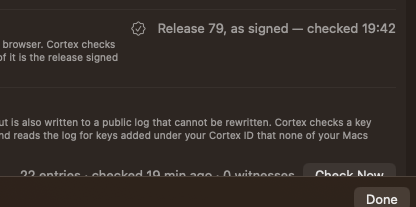
In Settings → Cortex ID, the Key Log line shows the size and age of the last head Cortex checked and how many witnesses signed it. Check Now reads the log again. An alert or a split view appears above it.
What is switched on
The checks are on in Cortex from version 0.26.0, the build that carries the log's key, and Cortex has required the witnesses' co-signatures since version 0.27.2. A build without the log's key checks nothing, and says so in Settings, so a build never refuses keys of a server that serves no proofs.
What the log does not do
It does not prevent a false key. It makes one leave evidence, and Cortex finds it. It does not replace a fingerprint: where you need certainty right now, compare one with the person. See Verify who you share with. The log is also a record of keys, not of who you are. A name is still your word.
For the bigger picture, see End-to-end encryption in plain words.
Something wrong or missing? Tell us