 Cortex
Extra roots
On this page
Let a context's sessions work in a second folder, from a .code-workspace file or a setting.
A session is kept to its context's folder. Some contexts are meant to work across folders, for example a folder of instructions that edits several repositories beside it. Extra roots widen a context on purpose.
What they do
An extra root is an additional folder that a context's sessions may also reach. By default a context has none.
- Claude Code gets each as an extra directory it may work in.
- Codex gets each as an extra writable folder. This applies whenever Codex's own sandbox lets it write. In a folder Codex has not trusted, it stays read-only.
- With the OS sandbox on, each is opened exactly as the context's own folder is. See Turn on the OS sandbox.
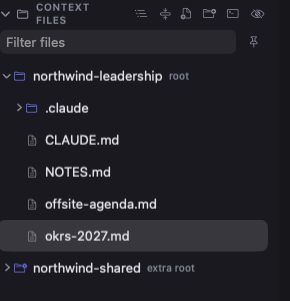
- In the sidebar, each shows in the file tree as a top-level node marked "extra root", and Find in context searches it. See The file tree.
Where they come from
There are two sources. Both can be used together.
- A workspace file. If the context contains a
.code-workspacefile, the folders it lists become extra roots. If there are several such files, the one named after the context's folder wins. To use another one, choose it in Context Settings…, in Workspace file. Cortex reads the file only if it is an ordinary file of at most 1 MB. - By hand. In Context Settings…, type a full path and press Add, or press Choose… and pick folders. A typed path may start with
~. A relative path is refused.
Context Settings… shows the resolved list as "Sessions may also work in", which is exactly what a session will be given. Saving updates the open context's tree, watcher and search index in place. Context Settings describes the rest of the sheet.
Extra roots apply to sessions you start after the change.
Letting a context start sessions in its extra roots
A context can also be marked as a conductor, which lets its sessions start and follow sessions in its extra roots. That is a switch in Context Settings…, under Cortex tools. Cortex asks you every time a session would start one.
How this fits the rest
Extra roots are one part of how a session is kept to its context. How sessions are kept to their context explains the rest.
Something wrong or missing? Tell us