 Cortex
Context notes and memory
On this page
The sticky note backed by NOTES.md and the agent's memory row.
Two small things in the sidebar keep knowledge about a context in view: a note you write yourself, and the memory the agent keeps for the context.
The context note
Context notes is a sticky note at the foot of the sidebar, in pale yellow on light themes and a warm tint on dark ones. It is backed by a file, NOTES.md at the context's root, and shows "Jot something for" the context's name while it is empty.
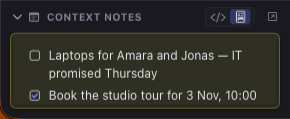
- Write in it. It is a compact Markdown editor. The header's Source and WYSIWYG switch is one choice for every context, kept between launches. Its text size is a setting, Context notes font size in Settings → Appearance.
- It saves when you press ⌘S, when the note loses the keyboard, when you switch context, when you leave the app and when you quit, never on a timer. While it holds text not yet written, a small accent dot follows the section's title. An empty note never creates the file.
- Open it as a tab. The ↗ button in the header opens the file in a tab, creating it empty if needed. It only works while the note has no unsaved text and no conflict.
- It is the same document as the tab. Both show the same words. If the file changes on disk while you have unsaved edits, the banner of When an agent changes a file you are editing appears above the note. Otherwise the note just reloads.
- Choose another file. In Context Settings…, set Notes file to a Markdown file relative to the context's folder, such as
docs/NOTES.md. Its folders are created if missing. Empty meansNOTES.md. See Context Settings. - Make it smaller. Drag the section's divider down to 96 points, or fold it with the chevron before its title.
The context memory row
For Claude Code, the top of the Context sessions list can show a row, Context memory · MEMORY.md. It appears when Claude Code has written a MEMORY.md for the context. A click opens it as a normal Markdown tab.
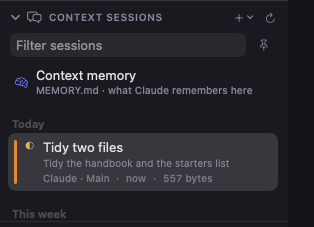
This is the agent's own file, not something Cortex adds. Each account has its own, so with several accounts another account's row says whose it is. Codex keeps no such file, so a Codex-only context shows no memory row.
Something wrong or missing? Tell us