 Cortex
When an agent changes a file you are editing
On this page
Reload, Keep mine or Diff; deleted files; nothing merged and nothing lost.
An agent edits the same files you have open. Cortex is built so that neither of you destroys the other's work. It never merges, and it never decides for you: a file you have not touched takes the agent's version, and a file with your unsaved edits keeps your text and asks.
What happens
| Situation | What Cortex does |
|---|---|
| The file changes on disk and you have no unsaved edits | It reloads silently and keeps your place where it still fits. The tab flashes once so that you notice. |
| The file changes on disk and you have unsaved edits | It keeps your text and shows a banner. Nothing is merged. |
| The file is deleted on disk | It shows a banner: Deleted on disk · Keep as new file · Close. |
The banner: Reload, Keep mine or Diff
The banner reads "Changed on disk by session title" when it knows which session wrote the file, or "externally" when it does not, followed by three buttons.

- Diff shows the two versions side by side. Use it to decide.
- Reload throws away your unsaved text and takes the version on disk.
- Keep mine keeps your text and writes it over the version on disk at once, then clears the banner. If the write fails, the banner stays and your text stays unsaved, so you can try again.
Compare with Diff
Diff opens a sheet with your unsaved text on the left ("Mine (unsaved)") and the file on disk on the right ("On disk"). A line only in your text is banded red and marked −, and a line only on disk is green and marked +. Inside a changed line, the part that differs is marked more strongly. The header counts the changes and the lines on each side, or says "No differences".
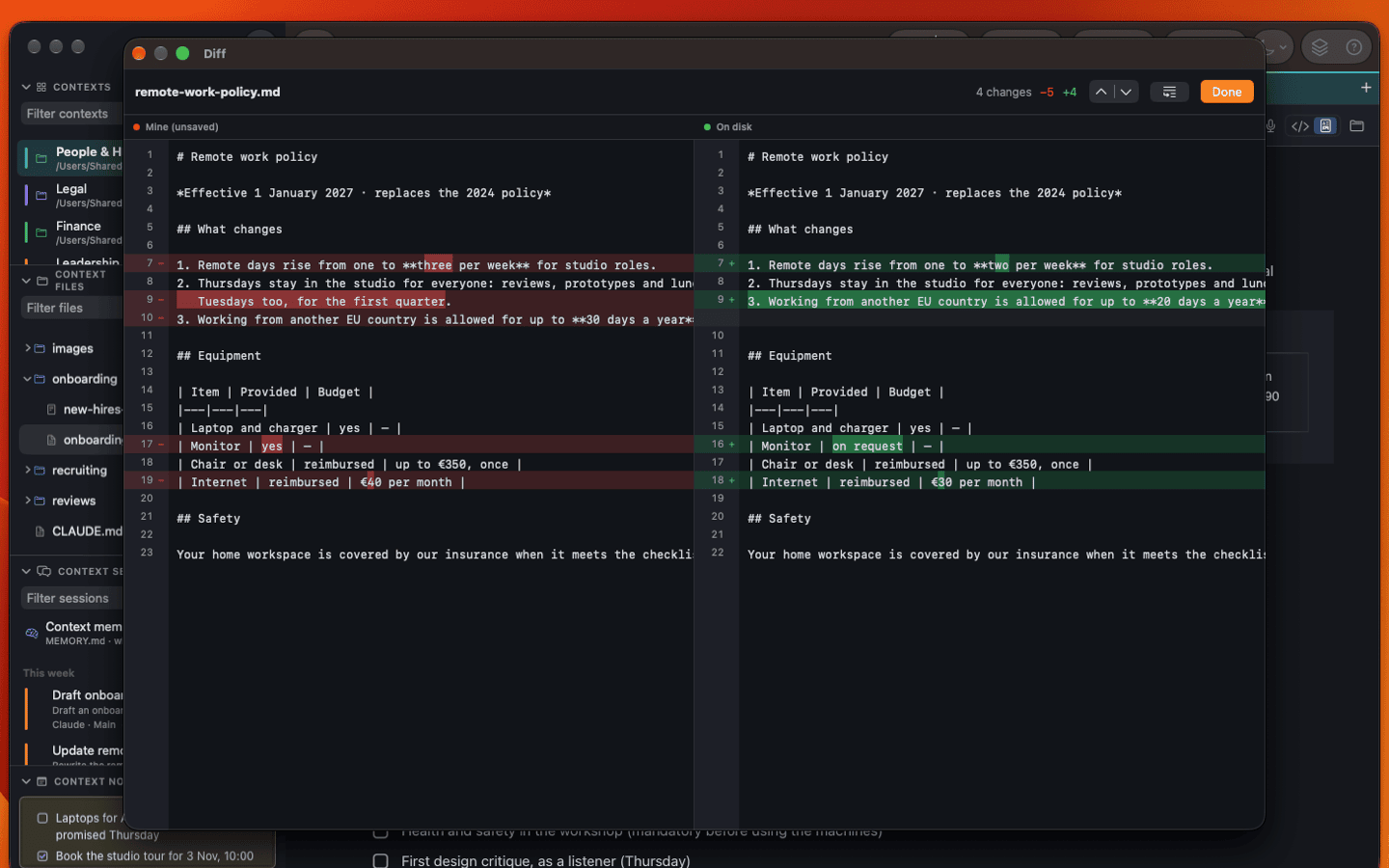
- The panes scroll together. Turn on Wrap Lines in the header to wrap long lines at the pane's width; it is off by default and remembered.
- Use the previous and next buttons to step through the changes. They wrap around.
- Drag the sheet's edges to resize it. Choose Done to close it.
- A Windows line ending is not counted as a difference.
If the file was deleted
Keep as new file writes your text back to the same path. Close closes the tab. If the file reappears, for example because a checkout switched back, the banner goes by itself.
Rules you can rely on
- While the banner shows, Cortex does not autosave. Your text stays in the editor. Only an explicit save with ⌘S, or Keep mine, writes over the disk version. Quitting asks if there is unsaved text.
- Every save looks at the disk first. If the file changed in a way Cortex has not noticed yet, a clean tab takes it as a reload and a tab with edits shows the banner instead of saving over it.
- If the change on disk is reverted to the text you started from, the banner goes.
- The same file open in two groups is one document, so your own tabs never conflict. On the Stack a file is its own document: saving one reloads the other, or raises its banner. See The Stack.
- A file you open through a link is tracked by the file it really is. If the link is trashed while its target is still there, the tab keeps your text and says so.
Agents can also propose a change as a diff before anything is written; see Review before apply.
Something wrong or missing? Tell us