 Cortex
A private memory per context
On this page
The vector store: documents your sessions search by meaning, kept on your Mac, and how to see and delete it.
A context can have a memory of its own that its sessions fill and search. A session stores documents in it, and any session of the same context can find them again by meaning, not only by exact words. It is useful for decisions, reference notes and the text of files you want agents to be able to ask about.
Everything stays on your Mac. The memory is a file in Cortex's own data, never in your context folder, so it is never committed or synced with the context. The text is turned into searchable form on your Mac with Apple's on-device language model. No text and no vector is sent anywhere. The one network access involved is Apple's, once: the first use of the on-device model may make macOS download that model's assets, as it does for dictation. No document text is part of that download.
How it works
- One memory per context. Every session of the context shares it. A session of another context never sees it.
- Collections. A memory holds named collections, each with a description saying what it is for. A collection holds documents. A document keeps its text, so a result can show what it found.
- Search. A search finds passages by meaning and by words together, and can narrow by simple filters. Results show the passage and where it came from.
- Indexing files only on request. Cortex never walks a context to index it. A session indexes files only when it is asked to, and only text files of the context, up to 2 MB each. Cortex then keeps those files up to date: a changed file is read again, and a deleted one is dropped.
Turn it on or off
Open Settings → MCP and look at the Vector store part.
- Turn the part on or off.
- Agents use these tools without asking decides whether the agent's own program asks before each call. Deleting a whole collection always asks you in Cortex, whatever this says.
- Sessions may index the context's files lets a session read files of its context into a collection. It is on by default. Nothing is indexed unless a session asks.
See and delete what a context remembers
- Open the context's row menu in the sidebar and choose Context Settings…. See Context Settings.
- Scroll to Vector store.
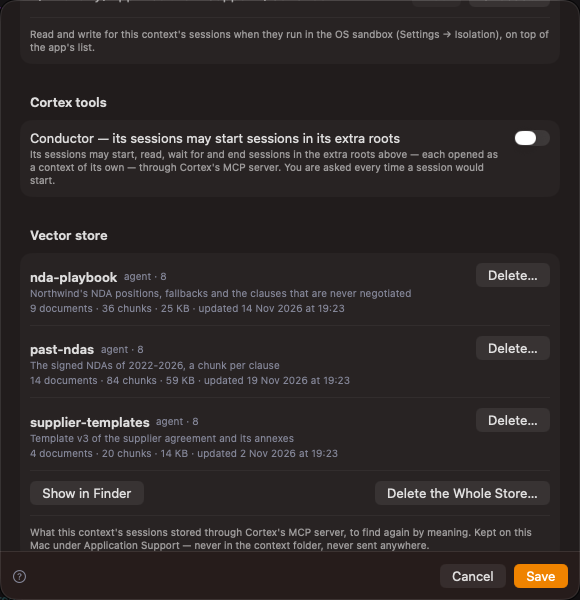
It lists each collection with its documents, chunks, size and last change. You can:
- Show in Finder reveals the store's file.
- Delete… removes one collection.
- Delete the Whole Store… removes everything the context's sessions put in.
Removing a context from Cortex's list does not delete its store. Delete… does. A store is never copied, synced or sent, and it is part of your Time Machine backup like the rest of Cortex's data.
Limits
A context's store holds up to 64 collections, 250,000 passages and 2 GB. A call that would go over is refused with the figure, and nothing is half-written.
Minis and the memory
A mini can search only the collections you grant it, or all of those of its bound context. See Give a mini knowledge.
The nine tools, with every parameter, are in Tools reference: the vector store.
Something wrong or missing? Tell us