 Cortex
Give a mini knowledge
On this page
Files indexed on your Mac, granted collections of a context's memory, and what a mini is told.
Knowledge is what a mini may look things up in before it answers. A mini with knowledge can say where an answer comes from. One without it answers from its role and its model alone.
What a mini can know
- Its own files. Documents you add to the mini itself, such as an NDA playbook.
- Granted collections. Collections from a context's private memory, which you grant to the mini one by one.
- Everything of its bound context. A mini bound to a context can search every collection of that context's memory, without a grant.
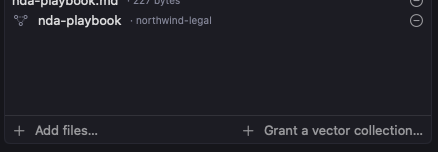
Add files
- Open the mini's editor (see Create a mini).
- In the Knowledge box press Add files… and choose files. Press the remove button on a file's row to take it away.
- Press Save.
Cortex indexes the files on your Mac into a store of the mini's own. Nothing is sent anywhere for indexing. A text file is indexed up to 2 MB and a PDF, by its text, up to 20 MB. Other kinds of file are listed and the mini can open them with its file tools, but they are not searched by meaning.
The index follows the files. It updates when you add or remove a file, when the mini starts, and before every search, so a changed file is read again and a deleted one is dropped.
Grant a collection of a context's memory
If a context has a private memory, you can let a mini search part of it.
- In the editor's Knowledge box press Grant a vector collection….
- Choose a context that has a memory, then one of its collections. The sheet shows each collection's documents and description.
- Press Grant.
A granted collection is searched only in rooms of that same context. A mini sitting in a room of another context does not see it.
Reach
Reach is a separate setting. When it is on, the mini may also read the context folder of the room it sits in, read-only. It is off by default. It does not let the mini write anything.
What the mini is told
Cortex tells the mini the names of its files and collections, and which contexts it may read. It tells the mini to search before answering a question its knowledge may hold, to read further when needed, and to say where an answer comes from. The mini searches by meaning and by words together.
Something wrong or missing? Tell us