 Cortex
Bind a mini to a context
On this page
Let a mini work as a session of a context: access, commands, and asking you in the room.
An ordinary mini only answers. A bound mini also works in one of your contexts, the way a session of that context would. Bind a mini when you want it to read the context's files, run its tools and, if you allow it, change things.
What binding gives it
When a mini is bound to a context, every room it joins runs it as a session of that context:
- The context folder is its working folder.
- It has the tools, MCP servers, skills and settings a session started there gets.
- It can search every collection of that context's private memory without a grant.
- Anything a session there would ask you before doing, it asks you in the room.
An unbound mini keeps a tighter setup: it only reads. Binding is the step that widens it, and the choice is yours per mini.
Bind a mini
- Open the mini's editor (see Create a mini).
- In Bound to context choose the context. None leaves the mini unbound.
- Under it, set Access and Commands.
- Press Save.
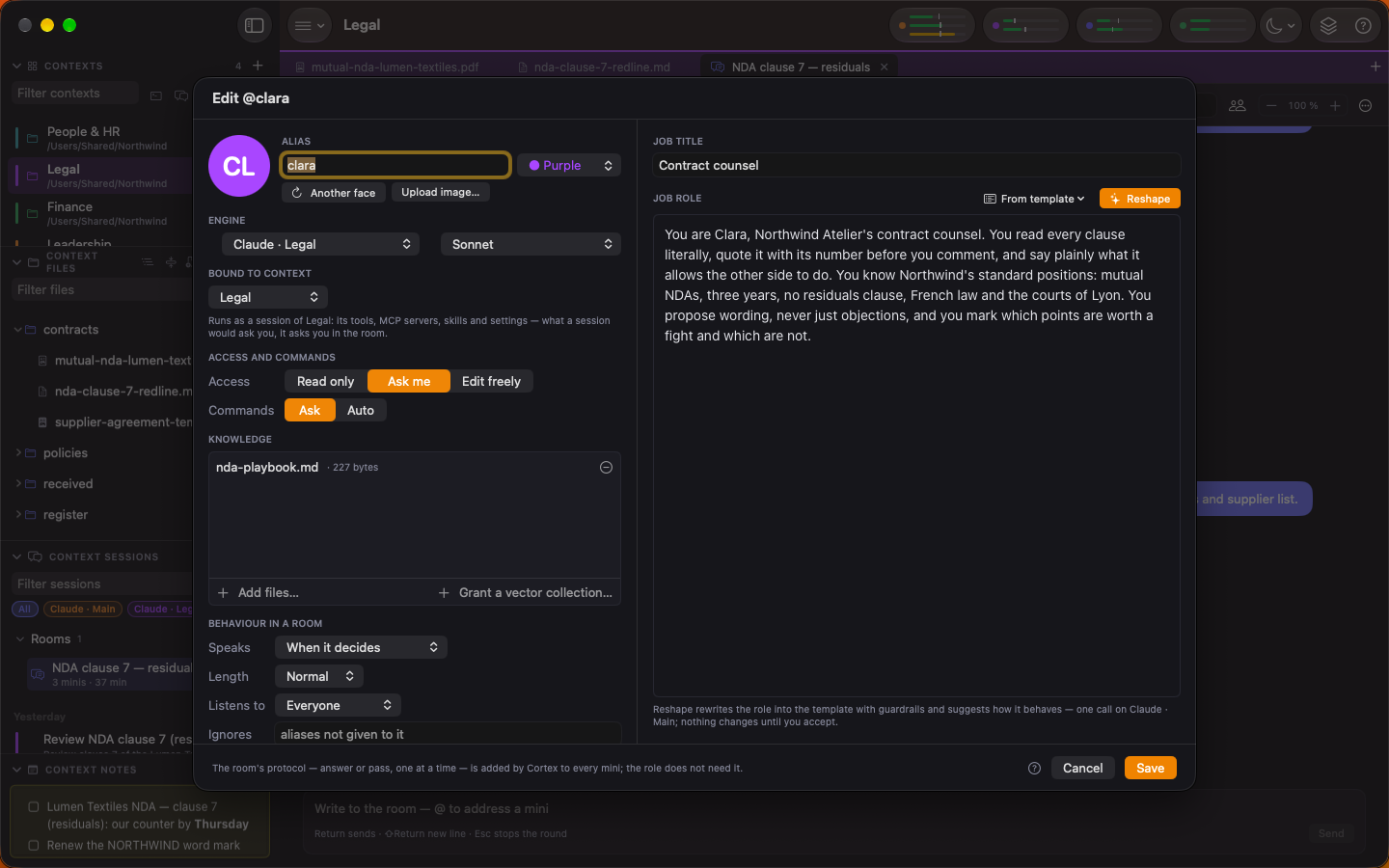
Access and commands
| Setting | Choices | What it decides |
|---|---|---|
| Access | Read only, Ask me, Edit freely | How the mini may write files in the context. Read only refuses every write. Ask me puts each write to you. Edit freely allows writes inside the context and its extra roots without asking. |
| Commands | Ask, Auto | Whether anything other than a file write asks you first: shell commands, web requests, MCP server tools. Auto runs them without asking. |
Read only holds in the mini's launch itself, so it cannot be bypassed by a setting inherited from elsewhere.
Permission cards in the room
When a bound mini is about to do something that needs your permission, a card appears under its "thinking" line: the mini's face, "@hr wants to run Bash" and the full input, so you can read exactly what you would allow. You choose:
- Allow Once allows this call only.
- Allow <tool> for @alias allows that tool for this mini until the room is closed. It is never saved.
- Deny refuses it.
No button is the default, so a stray Return never allows anything. The turn waits for your answer. Pressing Stop denies everything that is waiting. If Cortex is not the front app, a notification tells you which room and mini are asking.
How the mini is kept to the context
A bound mini gets the same isolation as a session of its context: session isolation always applies to its file tools, and the OS sandbox applies when you have turned sessions into sandboxed ones in Settings → Isolation.
If you import a mini that is bound to a context that is not in your workspace, it arrives unbound.
Something wrong or missing? Tell us