 Cortex
Install and sign in to Codex
On this page
Install with npm or Homebrew, codex login, and what Cortex reads from ~/.codex.
Codex is OpenAI's coding agent, the codex command. Cortex runs it in a terminal of its own for each session and reads its sessions from ~/.codex. You install it once and sign in once. This article is the one that Settings → Agents sends you to for Codex.
Install Codex
Open a terminal, either Terminal.app or a terminal tab in Cortex (New Terminal in a tab group's + menu), and run one of these commands.
| Way | Command |
|---|---|
| npm | npm install -g @openai/codex |
| Homebrew | brew install --cask codex |
OpenAI's Codex CLI documentation has the details and any changes.
Then let Cortex look again:
- Open Settings → Agents.
- Click the Codex row in Local agents.
- Press Detect again.
The row should show a version and a path instead of "not found". In the first-launch tour, press Check Again instead.
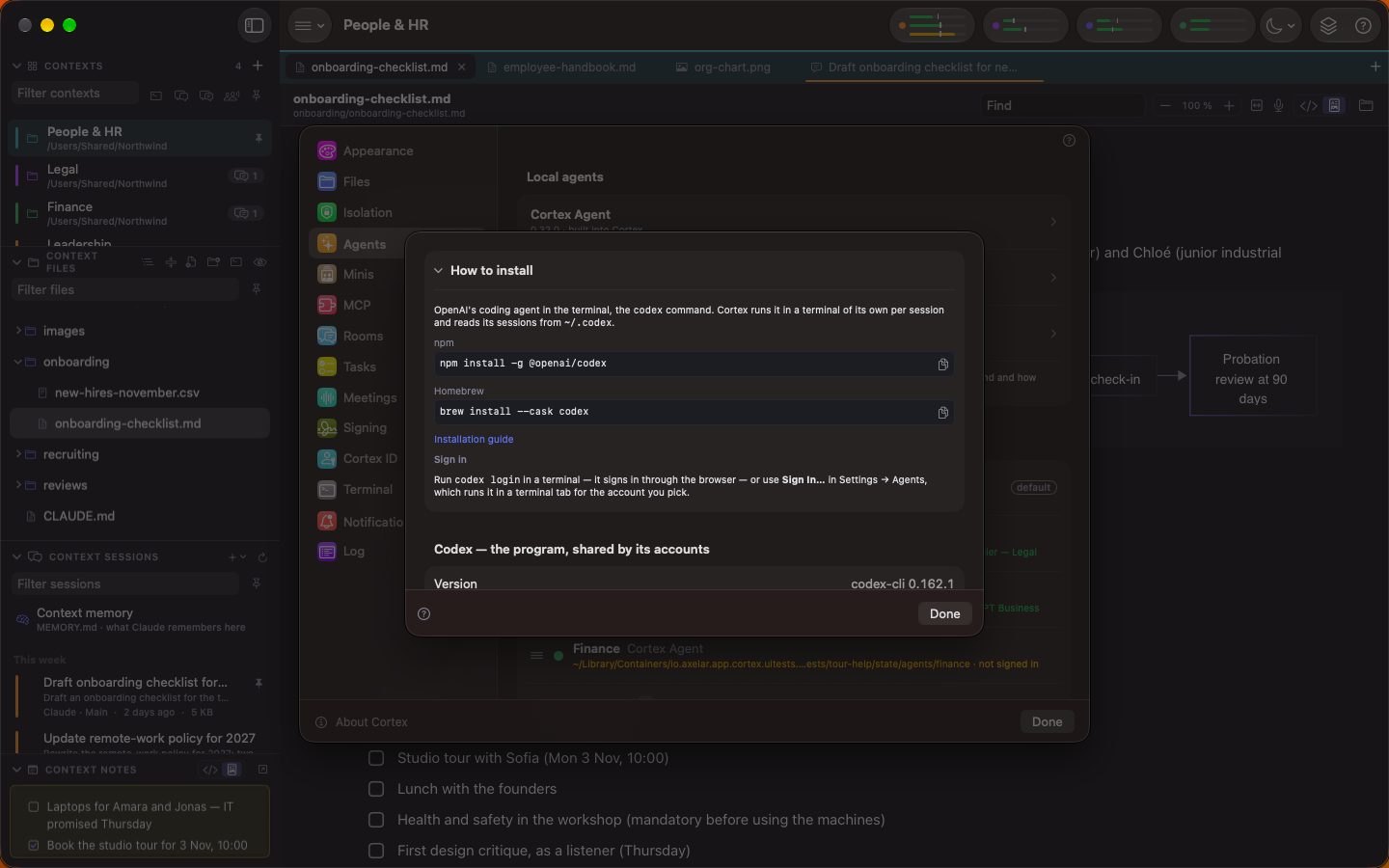
Cortex finds codex the same way it finds claude, with the same Path override, Detected and Detect again controls. Install and sign in to Claude Code lists the order Cortex looks in.
Sign in
Sign in once for each account. You can do it in either of two ways:
- In a terminal, run
codex login. It signs in through your browser. - From Cortex. In Settings → Agents, under Accounts, click the Codex account and press Sign In…. Cortex runs
codex loginin a terminal tab for the account you picked, and for an account of its own folder it sets that folder for the command.
Codex's own account appears in Settings → Agents once its folder, ~/.codex, exists. Who the account is signed in as shows on its row: the email address and ChatGPT plan, or "API key" when you signed in with a key. Until then it reads "not signed in" in amber.
Cortex never sees your OpenAI password or token. Your keys and sign-ins says where they live.
What Cortex reads from ~/.codex
- Sessions. Codex files each session by date, under
sessions/, and Cortex lists the ones that ran in a context's folder or below it. Titles come from Codex's own index, or from the first prompt you typed. - Who you are. The sign-in, from
auth.json. - Your plan's limits. Codex records them with every turn, and Cortex draws them as meters without starting anything. Read the usage meters explains them.
If you use more than one plan, add another account. When you do, you can bring over AGENTS.md, prompts and skills, and config.toml once. Use several accounts of one agent explains how.
How Codex differs from Claude Code in Cortex
- No hooks switch. Codex has hooks of its own, but each must be trusted inside Codex first, so Cortex installs none. It reads the session's record to know whether a turn started, finished or asked for approval, and that drives the same glyphs on tabs.
- No name for a new session. Codex has no flag for it, so use Rename… afterwards. See Resume or fork a session.
- Its own sandbox. Codex runs in its own sandbox and approval policy, as set in its
config.toml. Cortex adds a context's extra roots as writable folders and changes nothing else. How sessions are kept to their context explains what that means. - No tested version range. Cortex shows the version of Codex it finds but never warns about it.
If something does not work
- Not found. See Cortex can't find an agent.
- Not signed in. See An agent or a meter says 'Not signed in'.
When both are fine, start your first session.
Something wrong or missing? Tell us