 Cortex
An agent or a meter says 'Not signed in'
Sign in again from Settings → Agents; why a meter waits.
Symptom
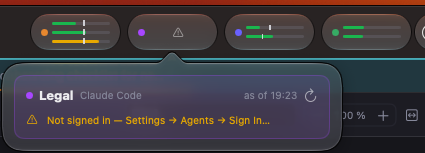
An account's row in Settings → Agents says "not signed in" in amber, or its usage button in the toolbar says "Not signed in — Settings → Agents → Sign In…". For a Cortex Agent account, the row says "key refused — sign in again".
Cause
Cortex reads who an account is signed in as from the agent's own settings in the account's folder. If there is no sign-in there, or the agent no longer accepts it, the account counts as signed out. Cortex does not ask a signed-out account about its usage, so that nothing fails before you sign in, and its meter waits instead.
For a Cortex Agent account, OpenRouter refused the key, either because it was revoked or because it expired. A server account's key can be refused by its server in the same way.
Fix
- Open Settings → Agents and click the account's row.
- Choose Sign In… (it reads Sign In Again… if the account was signed in before). Cortex opens a terminal tab in the selected context and runs the agent's own login. Sign in once in your browser, and the login exits.
- Switch back to Cortex. It watches the account and refreshes Settings, its meters and the session list as soon as the sign-in lands, for up to ten minutes.
Cortex never sees your password or token. The exact commands for each agent are in Install and sign in to Claude Code and Install and sign in to Codex.
For a Cortex Agent account on OpenRouter, choose Sign In Again with OpenRouter… or Paste a Key…; see Add an OpenRouter account. For a server account, the row reads "key refused — set it again": choose Change Key… and enter the key the server expects.
Once you are signed in, the meters return. They are explained in Read the usage meters.
Something wrong or missing? Tell us