 Cortex
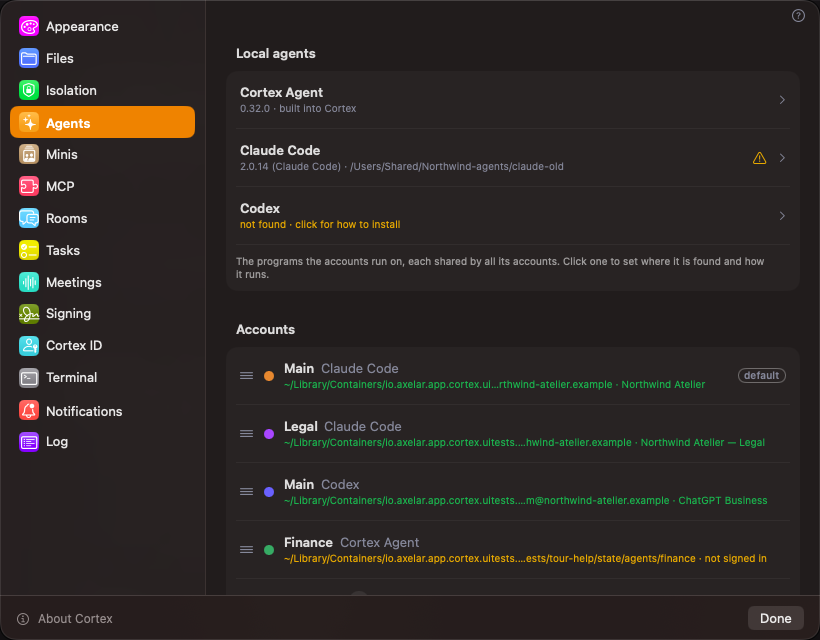
A warning beside an agent's version
Versions outside the tested range and what still works.
Symptom
A ⚠ sits beside an agent's row in Settings → Agents, and the agent's dialog shows a line in amber under its version, such as "Claude Code 2.3.0 is not a version Cortex was tested with (2.1.296 up to 2.2.0): sessions may not start or show their state."
Cause
Claude Code changes its flags and its hook messages between releases. Cortex was checked against Claude Code from 2.1.296 up to, but not including, 2.2.0. A version outside that range may work, but nobody has checked, so Cortex warns you. Codex has no tested range, so it never shows this warning. A version number Cortex cannot read shows no warning.
What still works, and what may not
Nothing is disabled. If a newer Claude Code works, you can ignore the warning. When it does not, you will see one of these:
- A session ends at once. Cortex records the exit and its code in the log, and the terminal keeps whatever the agent printed, so the failure is never silent.
- A session's state glyph, or its notifications, do not change as they should, because those depend on messages from the agent.
Fix
If something misbehaves, install a version inside the range. The commands are in Install and sign in to Claude Code. Then open Settings → Agents and click Detect again in the agent's dialog.
If the agent is not found at all, see Cortex can't find an agent.
Something wrong or missing? Tell us