 Cortex
A share is waiting, lapsed or expired
On this page
Waiting for the sender, lapsed invitations, Ask the Sender Again and Invite Again, expired shares.
Symptom
A share you received will not open. In Shares, or Shared with Me, it shows one of:
- Waiting for the sender
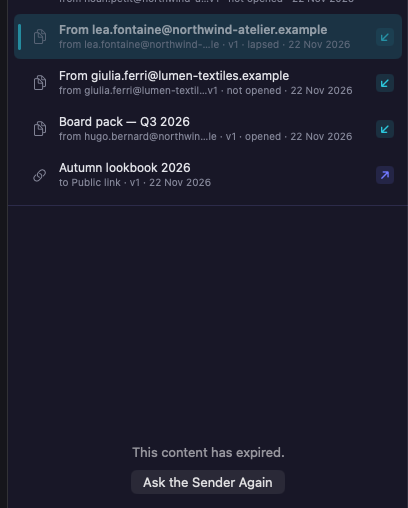
- This content has expired, with Ask the Sender Again
- sender suspended
Waiting for the sender
Cause. You reset your Cortex ID key. A share was encrypted to your old key, so it cannot be opened until its sender's Cortex sends the keys again, to your new one.
Fix. Nothing to do on your side but wait. The share changes by itself as soon as the sender's Cortex is online. It is marked readable again until you open it. Its time to open stopped while it waited and resumes with what was left. You can also ask the sender to open Cortex. See Rotate or reset your key.
Lapsed: This content has expired
Cause. An invitation is good for 3 days, which is 72 hours, counted from the moment the share's keys are there for you. Opening it after that shows "This content has expired".
Fix, as the recipient. Choose Ask the Sender Again. It tells the sender that you asked.
Fix, as the sender. Cortex tells you that someone asked again and offers Invite Again, which gives them a new 3 days. Inviting again does not count against your day's invitation limit. See Send new versions and manage a share.
Expired share
Cause. A share stops being served when its expiry date passes, by default one month after it was sent. After that you cannot open it. Thirty days after its expiry, the share is deleted from the server.
Fix. Ask the sender to change the expiry in the share's menu, to another date or to never. Until the share is deleted, a later expiry serves it again. The limits are listed in Share limits.
Sender suspended
Cause. The sender's Cortex ID has been suspended by Cortex Server's administrators, so the share cannot be served.
Fix. It opens again when the suspension is lifted. Nothing on your side changes it.
To open a share that works, see Open a share sent to you. If the person has no Cortex, see Share with someone who doesn't have Cortex.
Something wrong or missing? Tell us