 Cortex
 can't find an agent
Not found rows, the path override, a command installed in an unusual place.
Symptom
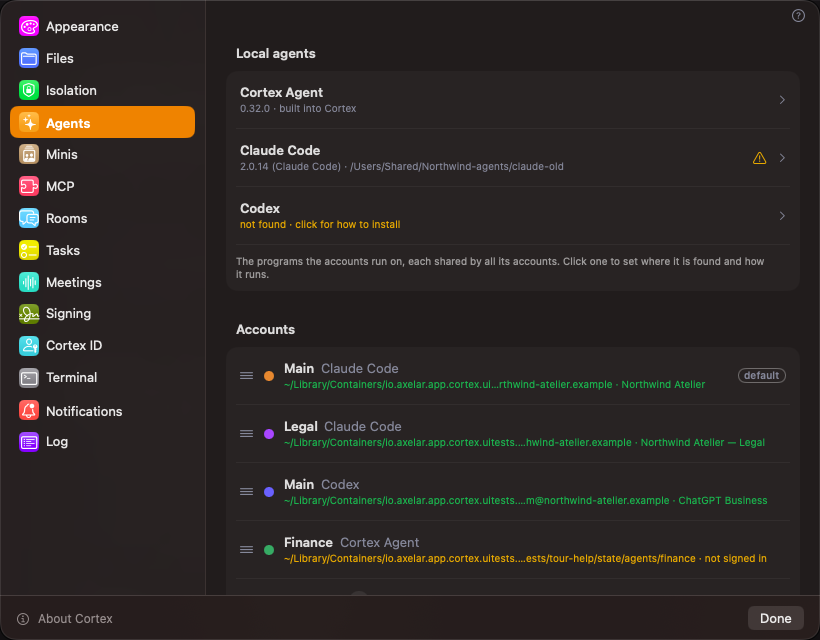
In Settings → Agents, an agent's row is amber and reads "not found · click for how to install". A new session of that agent refuses to start, and Settings says, for example, "claude was not found. Set its path in Settings → Agents → Claude Code." (or the same with codex and Codex).
Cause
Cortex is not started from your shell, so it does not see the PATH you use in Terminal. It looks for each agent in a fixed order and takes the first hit: the path you typed in Settings, then ~/.local/bin, then /opt/homebrew/bin, then whatever your login shell finds (zsh -lc 'command -v <name>', asked once when Cortex starts). A program installed somewhere else, or whose folder is added to PATH only in a file your login shell does not read, is not found.
The Cortex Agent is built in and is never "not found".
Fix
- If the agent is not installed, install it. Claude Code and Codex each have the commands. The agent's dialog in Settings also shows them, folded under How to install, and opens by itself when the program is missing.
- If it is installed, find its full path in Terminal with
which claude(orwhich codex). - Open Settings → Agents, click the agent's row to open its dialog, and type the full path into Path override. Press Return, or click Detect again. The Detected line shows the path Cortex now uses, and Version shows its version.
- If you installed the agent after starting Cortex and Detect again still does not find it, quit and reopen Cortex, or use the path override.
See also Which agents Cortex works with.
Something wrong or missing? Tell us