 Cortex
Which agents Cortex works with
On this page
Local agents, their accounts and the minis made from them: Claude Code, Codex and the Cortex Agent, and how the three layers fit.
Everything that thinks in Cortex rests on three layers, each built on the one below:
- Local agents. The programs that do the work: Claude Code, Codex and the Cortex Agent. They appear side by side in the same tabs, the same session list and the same usage meters.
- Accounts. One sign-in of a local agent, with its own plan or credits, sessions and limits. You can keep several accounts of each agent, and every session runs on one of them.
- Minis. An account made specific: a name, a face, a role and what it knows. Minis answer in rooms and do the work of tasks, and each one's answers count against its account. See What minis are.
The local agents
| Agent | What it is | What you do |
|---|---|---|
| Claude Code | Anthropic's coding agent, the claude command in a terminal |
Install it and sign in yourself |
| Codex | OpenAI's coding agent, the codex command in a terminal |
Install it and sign in yourself |
| Cortex Agent | Cortex's own agent. It chats with any model of your OpenRouter account, or of a model server you run yourself | Nothing to install. Add an account |
Claude Code and Codex
These two run in a terminal tab, one per session, in the context's folder. Cortex finds the program on your Mac, starts it for each session and reads the agent's own session records to fill its session list. A session you start outside Cortex shows up in Cortex too.
- To install and sign in to Claude Code, follow Install and sign in to Claude Code.
- To install and sign in to Codex, follow Install and sign in to Codex.
The Cortex Agent
The Cortex Agent is built into Cortex, so there is nothing to install. Its sessions are chats in tabs, and you can switch the model in the middle of a conversation. It needs an account for the models it uses:
- an OpenRouter account, signed in to in your browser or with a key you paste, as in Add an OpenRouter account, or
- a model server of your own, such as Ollama or LM Studio, as in Use your own models.
The Cortex Agent explains what it is and does.
Accounts
Each local agent can have more than one account, for example a work plan and a personal plan side by side. An account is an agent with a folder of its own, with its own sign-in, sessions and limits. Use several accounts of one agent explains how.
Minis
Once an agent has an account, you can make minis on it. A mini made on a Claude Code account thinks with Claude, one made on an OpenRouter account with the model you pick for it. What minis are and Create a mini go on from here.
See what Cortex found
Open Settings → Agents. The Local agents list has one row each for the Cortex Agent, Claude Code and Codex, with the version and where the program runs from. Under Accounts you see every account, whether it is signed in, and which is the default.
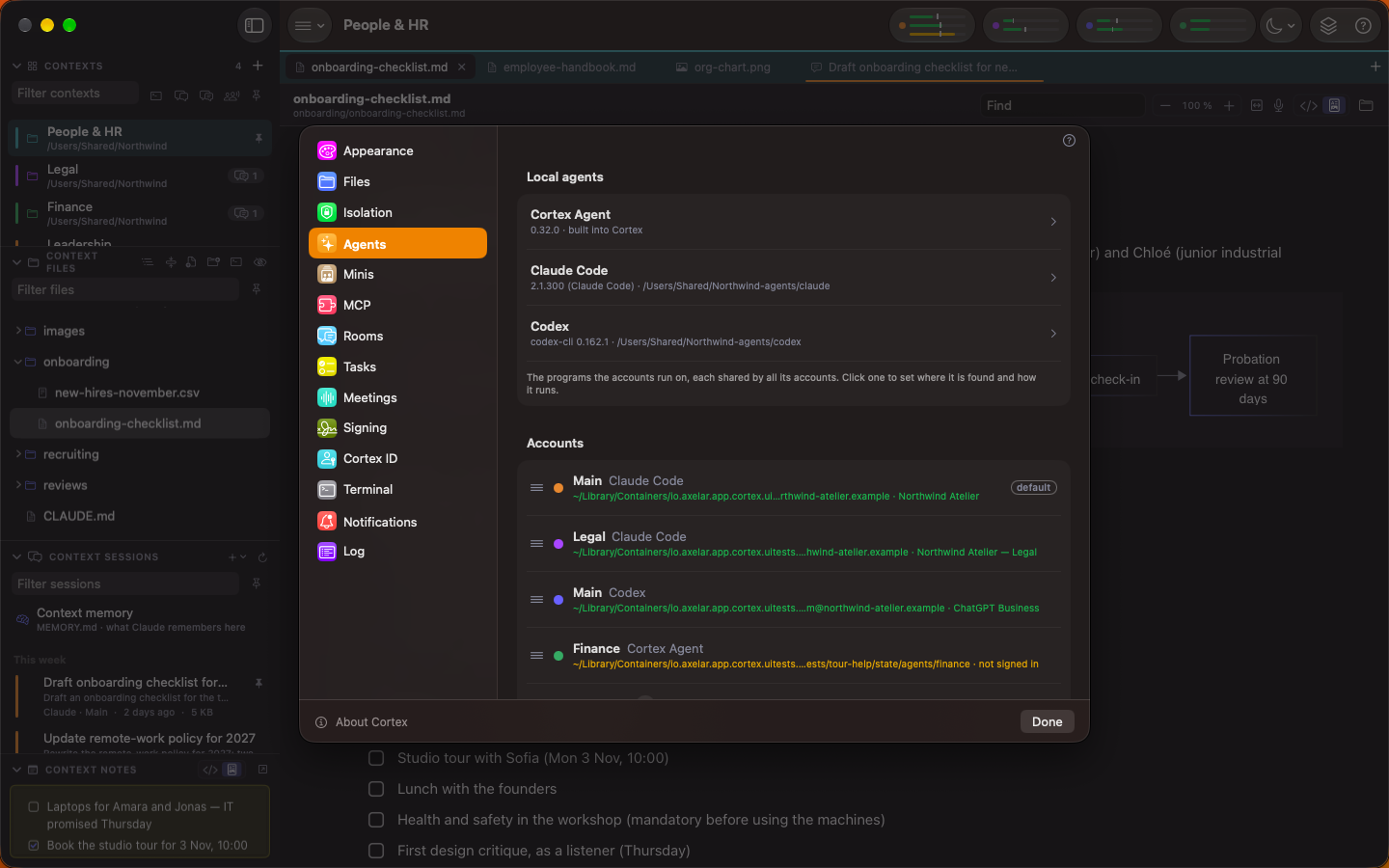
A row that says not found · click for how to install in amber means Cortex cannot find that program. Click the row to open its dialog, which shows the install commands. If you have already installed it, see Cortex can't find an agent.
How each agent is kept to its context
It differs by agent, and the strongest form is opt-in. How sessions are kept to their context explains what each agent is held to and what is not stopped.
If you have no agent yet
You can browse and edit files in Cortex without any agent. An agent is needed to run sessions.
Something wrong or missing? Tell us