 Cortex
Read the usage meters
On this page
What the toolbar bars show, colours and the pace tick, the popover, hiding a meter, the one warning.
The usage meters answer one question at a glance: how much of each plan have I used, and when does it refill? They sit at the right of the toolbar, one button per account.

What the toolbar shows
- One button per account, in your account order. With more than one account, each starts with the account's colour dot.
- Up to three thin bars per button, the account's meters in the order its agent reports them. A meter with no scale shows as short text.
- A colour: green, amber or red. When the agent states a status, that decides. Otherwise Cortex uses two fixed thresholds: amber from 70 % and red from 90 %.
- A pace tick. When Cortex knows when the meter's window began and ends, a tick marks how much of that window has passed. A fill beyond the tick means you are using the plan faster than it refills.
- A tooltip that lists every meter of the account with its figure.
If a refresh fails, the last values stay on screen, dimmed.
The popover
Click an account's bars to open its card, shown here for Claude Main.
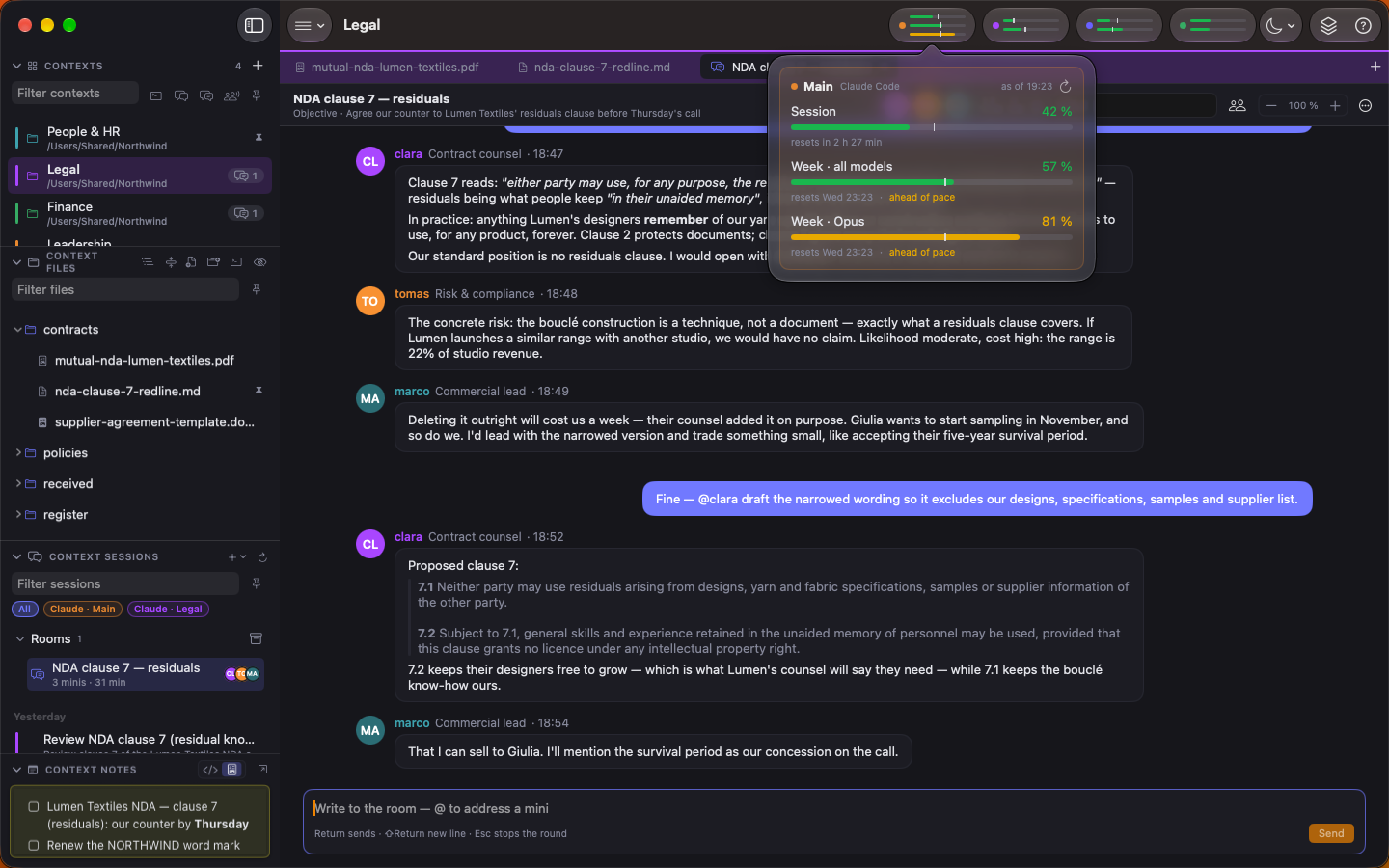
It shows the account's name, when the reading was taken, a Refresh button and the last error, if any. Every meter has its title and scope, its figure, a larger bar, when it resets ("resets in 2 h 14 min", or the weekday and time beyond a day), and "ahead of pace" when it is.
Where the numbers come from
| Account | Meters | Refreshed |
|---|---|---|
| Claude Code | Its plan's windows, such as the 5-hour window and the week across models and for one model, and extra-usage spend when it is enabled. Cortex asks Claude Code itself, which takes about two seconds, starts no session and spends no tokens | Every 3 minutes, and on Refresh |
| Codex | Each window of your plan, labelled by its length, such as "5-hour", "Week" or "30 days", and credits as text. They are read from the limits Codex records with every turn, so they are as fresh as the account's last turn | Every minute |
| Cortex Agent on OpenRouter | The key's credits or spend, any budgets, and free-tier requests. See Cost, caps and the context gauge | Every 5 minutes, and after each turn |
| Cortex Agent on your own server | None. A server bills nothing | Not applicable |
A Claude Code account signed in with an API key rather than a plan has no plan windows, and the popover says so as an error instead of drawing an empty bar. A Codex account none of whose sessions has reported limits yet says that, not an empty bar. An account that is not signed in is not asked at all, and its meters say "Not signed in". See An agent or a meter says 'Not signed in'.
Hide a meter, or all of them
- To hide one meter, open the account's dialog in Settings → Agents. Its Usage section has one switch for each meter the account has reported. A meter the account starts reporting later is shown until you hide it.
- To hide every meter from the toolbar, turn off Show usage in the toolbar, under the accounts in the same pane.
The one warning
When notifications are on, a meter that turns critical posts one notification for that meter and window, for example "Claude · Week · Fable — 97 % · resets Thu 03:59". A meter that drops below critical forgets it, so it notifies again the next time it turns critical. Cortex remembers the window across launches, so a restart does not repeat it.
Whether Cortex may notify at all is in Notifications and the Waiting sheet.
Something wrong or missing? Tell us