 Cortex
Cost, caps and the context gauge
The session's cost, a cap on one turn, credits in the meters, the gauge and compaction.
With the Cortex Agent you pay the model's provider through OpenRouter, so Cortex shows what each chat costs, lets you cap what one turn may spend, and tells you when a conversation is filling the model's memory. This article owns the cost cap, the context gauge and compaction.
What a chat has cost
The chat header's subtitle shows the session's cost so far. Cortex reads the exact cost of each call from OpenRouter and adds them up. Hover over it for the session's total, with tokens in, out, cached and used for reasoning, and the cost per model. A stored session shows its cost again from its transcript.
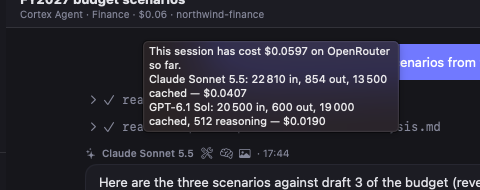
A server account has no cost: the server bills nothing, and the tooltip names the server instead.
Cap one turn
A turn is one message of yours and everything the agent does until it answers. To stop a runaway turn from spending too much, set Cap on a turn's cost in the account's dialog in Settings → Agents. It is off by default.
A turn that passes the cap stops before its next call and says, for example, "Turn stopped at $0.52 — the cap for this account. Write “go on” to continue." Your next message is a new turn with a new budget. Separately, a turn always stops after 100 steps, with "stopped after 100 steps".
If your OpenRouter account runs out of credits, the turn ends with "Out of credits on OpenRouter — add credits on openrouter.ai."
Credits in the usage meters
An OpenRouter account has a button in the toolbar like the other agents. It shows Credits when the key has a limit, Spent when it has none, one Budget for each budget on the key, and Free today on the free tier. Cortex refreshes it every five minutes and after each turn. Colours, the pace tick and the thresholds are explained in Read the usage meters.
The context gauge
Every model has a limit on how much it can hold in mind at once, its context length. The thin bar in the chat header compares the last call's prompt, in tokens, with that limit. It turns amber at 70 percent and red at 90 percent.
Compaction
When the prompt passes 85 percent of the model's context length, Cortex compacts the conversation at the start of the next turn. The session's own model summarises everything before the last two turns into one message: what was asked, decided and done, which files changed and how, and what is open. The last two turns stay word for word, so the work you were just doing keeps its exact paths and output. Later calls send the summary, those two turns and everything since.
- To compact on demand, type
/compactor choose Compact Now in the session menu. It happens between turns, by the same rule. - If a model refuses a call as too long, which can happen after you switch to a model with a smaller context, Cortex compacts once, keeps the turn under way, and tries again.
- The chat shows "— conversation compacted —". The transcript keeps everything, and a resumed session is rebuilt from the last summary.
Something wrong or missing? Tell us