 Cortex
Choose and order models
On this page
The Models sheet, badges, zero data retention, default model and reasoning effort.
OpenRouter lists several hundred models, which is a catalogue and not a menu. Each Cortex Agent account therefore carries the few you trust for a kind of work, in your order, with one marked as the default. You choose them in the Models sheet.
Open the Models sheet
- Open Settings → Agents and open the account's dialog.
- Choose Models….
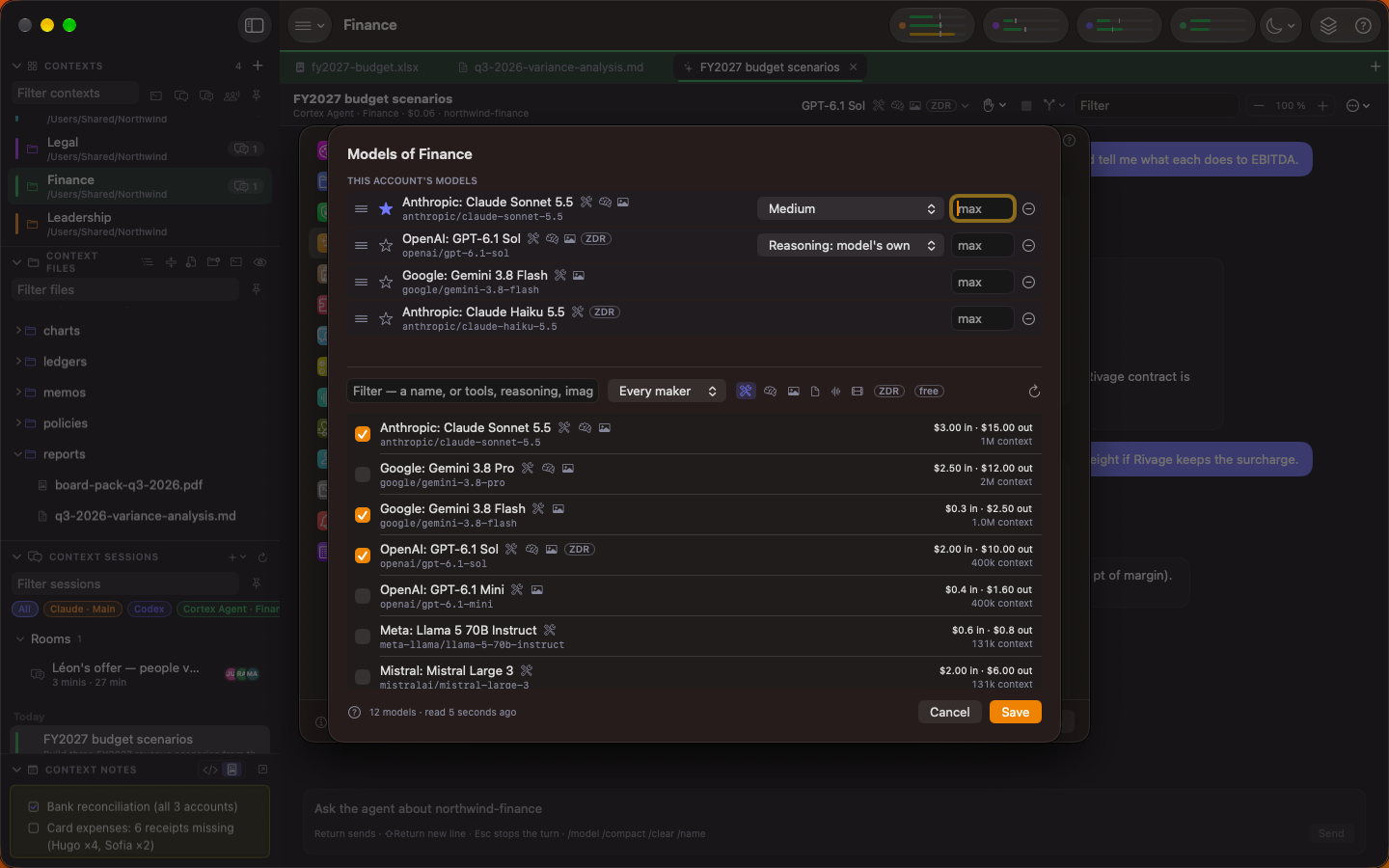
The chosen list is at the top, in your order. Drag a row by its grip (≡) to reorder it, click ★ to Make Default, and click − to remove it. The catalogue is below, newest first, with a checkbox on each row. A new account starts with none and asks for at least one before its first session.
Read a row
A row shows the model's name and id, its maker, its context length in tokens, and its price in and out per million tokens ("free" at zero, "varies" for OpenRouter's routing models). Hover over the price for a higher price above a large prompt. The badges tell what the model can do:
| Badge | Means |
|---|---|
| 🔧 | Takes tools: it can read and change your files. |
| 🧠 | Reasons before it answers. |
| 🖼, 📄, audio, video | Reads images, files, audio or video. |
| free | Costs nothing, though a free model may be rate-limited. |
| ZDR | Has at least one provider that keeps no data. Hover to see which. |
The same badges show on the model pop-up in a chat, on each answer's model line, and in the account's list.
Find a model
Type in the filter field. Each word matches the name or the id, or a type the model has (tools, reasoning, image, file, audio, video, zdr, free), so "sonnet zdr" finds the Sonnet models that offer zero data retention. The maker menu and the badge switches narrow it further: only models that have every switched-on type are listed. The tools switch is on by default.
The catalogue is read when the sheet opens, when you click Refresh, and at most once an hour otherwise. Cortex keeps the last answer, so the sheet opens at once and works offline.
A model that does not take tools
You can choose one, but only after a warning that it will answer without reading or changing anything. Cortex leaves the agent's tools out of its calls.
A model that leaves the catalogue
A model that expires or is no longer listed stays in your list, marked "no longer offered". You cannot choose it for a new turn. A session that was on it says so and offers the account's default.
Settings for one model
Both are optional. Set them on a chosen model in the sheet.
| Setting | Values | Default |
|---|---|---|
| Reasoning effort (only for a model that reasons) | low, medium, high | None sent. |
| Max output tokens | A number | The model's own limit, capped at 32,000. |
What each effort level does is the model's own: one model reasons at high and not at medium, another reasons unasked.
Keep calls to providers that store nothing
Switch on Zero data retention only in the account's dialog. Every call of its sessions then asks OpenRouter for providers that keep no data. The account offers only models that have such a provider, in the chat's model pop-up, in the + picker and as the starting model. A chat header says "ZDR only". A model with no such provider is refused with "No endpoints found matching your data policy". The ZDR tag says a model can keep nothing; this switch makes it so.
For a server account the sheet differs: see Use your own models.
Something wrong or missing? Tell us