 Cortex
What minis are
On this page
An account made specific: a role, a face and knowledge on top of one of your agents' accounts, defined once and used in rooms and tasks.
A mini is one of your accounts made specific. Under it sits a local agent, Claude Code, Codex or the Cortex Agent; on that agent, one of your accounts; on that account, the mini, with a name, a face, a short job description (its role) and, if you give it any, documents to draw on. You define it once and use it wherever you need that specialist: a contract lawyer, a sceptic, a finance controller. Which agents Cortex works with shows the three layers together.
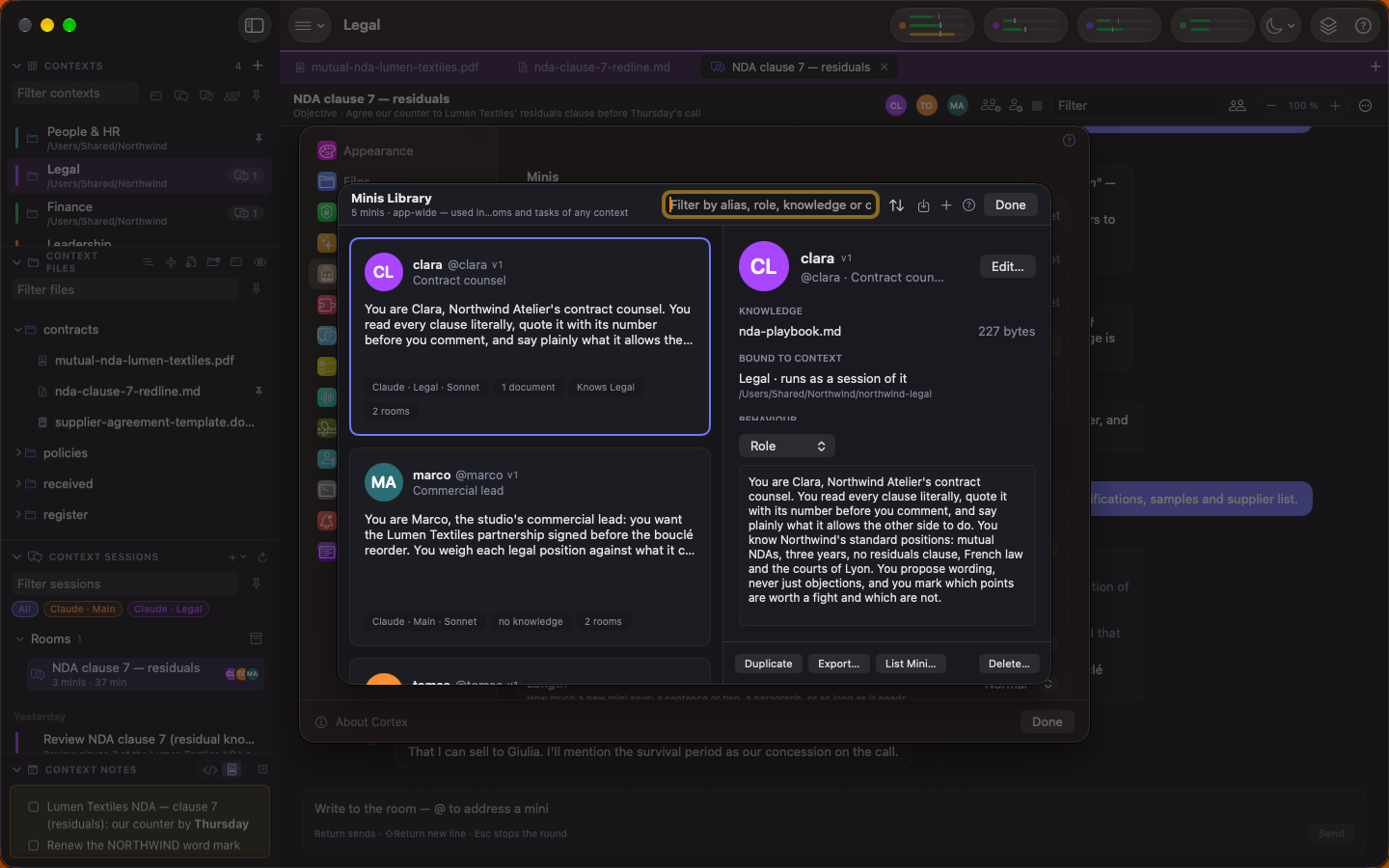
What a mini is made of
| Part | What it is |
|---|---|
| Alias | A short name, such as clara. It appears on the mini's messages and you use it to address the mini with @clara. |
| Title | A few words saying what it is, such as "Contract counsel". |
| Face and colour | Initials on a colour, or an image you upload. |
| Role | The text that tells the mini who it is and how to behave. |
| Engine | The account whose agent runs the mini, and optionally a model. |
| Knowledge | Files and memory collections it may look things up in. See Give a mini knowledge. |
| Listening rules | When it speaks: to everyone or only to you, and whether it needs to be addressed. |
Because a mini runs on an account, its answers use that account's plan or credits, just as a session's would.
Where minis are used
- In rooms. A mini is a member of a room and answers you and the other members. See Start a room.
- In tasks. A mini can be the worker of a task, and the other minis of the task can be consulted by it.
- By other people. You can list a mini for the people you name, and they talk to it from your Mac. See List a mini for other people.
Minis belong to no room and no context. They live in one library that covers the whole app.
What a mini can and cannot do
A mini runs the same way an agent does, one answer at a time, but with a narrower setup. A mini that is not bound to a context can only read: its own folder, its knowledge files and, if you allow it, the context of the room it sits in. It cannot edit your files. To let a mini work in a context like a session of that context, bind it to a context.
The library
The library is a sheet with one card per mini. Open it from the workspace menu in the toolbar (Open Minis Library), from Settings → Minis, or from Add Mini… in a room. Each card shows the face, alias and version, title, the first line of the role, the engine, how many rooms the mini sits in and the context it is bound to.
A card's menu has Edit…, Duplicate, Export…, Share…, List a Mini… and Delete…. You can also import a mini from a .mini.json file with Import…, or by dropping the file on the dashed card. An exported mini carries its role, its settings and its uploaded face; its knowledge files travel in a .mini folder beside the file.
Share it
A mini can be shared in two ways. Send a copy gives people you name their own mini to run on their account: see Send a copy of a mini. List a Mini… lets people you name talk to your mini from their own Cortex, while it stays on your Mac and answers on your account: see Let people talk to a mini of yours. Both need a Cortex ID, and for a listed mini the visitors need one too. See Sharing, in short.
To make your first mini, go to Create a mini.
Something wrong or missing? Tell us