 Cortex
Let people talk to a mini of yours
On this page
List a mini for named people; each asks and you approve; it runs on your Mac while Cortex runs.
Listing a mini lets people you name talk to it from their own Cortex. The mini stays on your Mac and answers from there, on your account. This is different from sending a copy of a mini, which they would run themselves.
How it works
- You list it for the email addresses you name.
- They ask. The mini appears in their Cortex, and they ask to talk to it.
- You approve each person once. You always decide.
- They talk. Their messages travel to your Mac over an encrypted channel, and your Mac answers.
You need a Cortex ID, and this Mac must hold its key. Visitors need Cortex and a Cortex ID too. There is no public access and no browser access.
List a mini
- Open the Shares view of the right-hand panel and click the + in its header, or open the Minis Library and choose List a Mini… on a mini.
- In Mini, pick the mini. The card is exactly what visitors will see: its alias, title and initials on a colour. No picture, role or knowledge leaves your Mac. A mini on a Codex account is shown but cannot be chosen.
- In Who can ask, type the addresses.
- Read How it answers, then choose List.
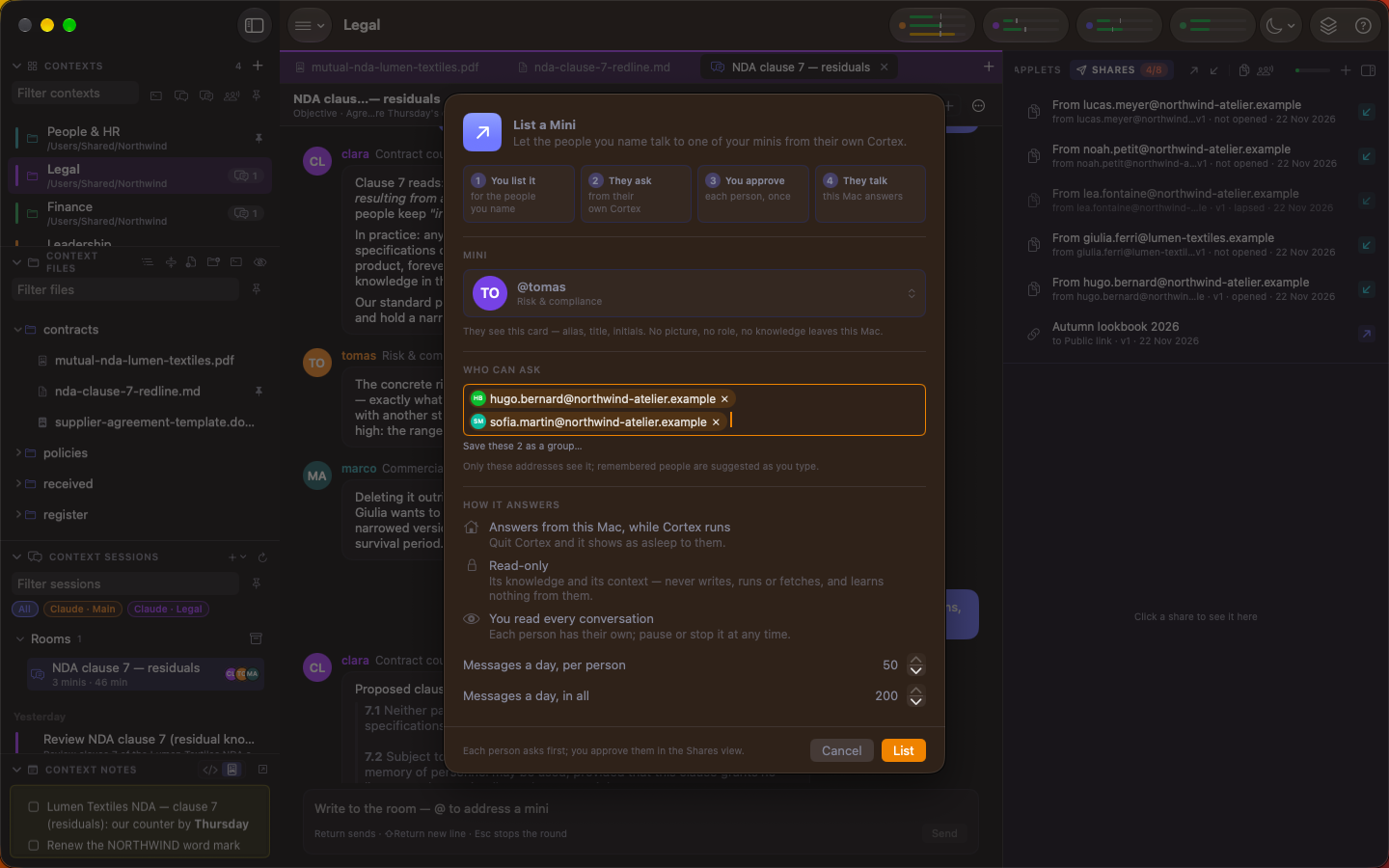
Addresses without a Cortex ID get an email that tells them a mini was shared and invites them to make one.
What the mini does for a visitor
- It answers from your Mac, only while Cortex runs. If your Mac sleeps or Cortex quits, the mini is asleep. A visitor cannot talk to it, and nothing is queued.
- It reads and never writes. For a visitor, the mini works with its own knowledge, and with the files of the context it is bound to, read-only. It has no tool to write, edit, run a command or reach the web, and anything that would ask for permission is refused without asking you.
- Each visitor has a memory of their own. Nothing one visitor says reaches another.
- It does not learn from visitors. No memory, feedback, lesson or example is kept from their conversations for your mini's training.
- It treats their words as untrusted. The mini is told so, and that you can read the conversation.
You can read everything
The card tells visitors that you can read what they write. In Cortex you see every conversation, past and live, and can pause, stop or delete it. You cannot answer in the mini's place. See Manage who talks to your mini.
Cost and limits
Your account pays for every turn. Cortex counts the messages and refuses past a daily cap, telling the visitor which cap and when it resets, at 00:00 UTC. The defaults are 50 messages per visitor per mini and 200 per mini for everyone. You can lower either in the sheet, never raise it. The server also limits how many conversations can be open on one mini at once (3) and how fast messages can flow.
Change or stop
A listed mini's row offers Edit Listing…, where you add or remove addresses and refresh the card, and Unlist…. Unlisting withdraws every visitor and deletes its conversations on your Mac. Removing an address from the listing withdraws the visitors that address alone let in.
A mini removed from your library stops answering, and its row offers Unlist.
How private is it
The conversation is encrypted between your Mac and the visitor's. The server relays it and cannot read it. It does see that a visitor talked to a mini and when. The conversation is kept on the two Macs only. See End-to-end encryption in plain words.
Something wrong or missing? Tell us