 Cortex
Resume or fork a session
Continue a stored session, copy it into a new one, rename or delete it.
Every stored session in the Context sessions list can be continued, copied, renamed or deleted. This article covers each, and the one difference people ask about: fork versus hand-off.
Resume
Resume continues a stored session as a live one, with the whole conversation as it was.
- From a transcript, press Resume ▶ in its header, or press ⌘↩.
- From the list, right-click the row and choose Resume.
A resumed session always runs on its own account, because its record lives in that account's folder. It starts in the folder it originally ran in, so relative paths stay as they were.
If the session is already live in Cortex, Resume shows its tab instead of starting a second copy.
Fork
A fork copies a session into a new one, so you can try another path from the same point and keep the original as it was.
- From a transcript or a running session, press Fork ⑂ in its header.
- From the list, right-click the row and choose Fork.
The new session appears as a new row. A running session can be forked too.
Fork or hand-off
Where the fork runs decides what it is.
| The fork runs on | It is | What happens |
|---|---|---|
| The session's own account | A fork | The agent makes its own copy, with the conversation exactly as it was |
| Another account of the same agent, or another agent | A hand-off | A new session starts there and is given the conversation so far, as text |
Hand a session to another account or agent explains what a hand-off carries and when to use it.
Choose where it forks
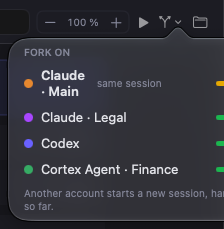
With more than one account, a small arrow beside Fork opens the fork picker, and a row's menu has Fork On ▸. Both list every account in your order, with the session's own marked "same session". Pick one to fork there. That account then becomes the one Fork uses next time, and the menu item names it when it is not the session's own, as in "Fork on Codex".
Rename
Right-click the row and choose Rename…, then type the new title. It starts with the current one. An empty name changes nothing.
For Claude Code, Cortex writes the same title record that /rename writes, so the name shows in Cortex, on the session's tabs and in claude --resume alike. For Codex it adds a line to Codex's own index.
Delete
Right-click the row and choose Delete Session…. Cortex asks first: the transcript moves to the Trash, and the agent can no longer resume it. It also moves the folder of the same name that holds sub-agent transcripts and tool results. You can put them back from the Trash. Tabs and Stack entries showing it close, and nothing else in the agent's folder is touched.
A session that is running in Cortex cannot be renamed or deleted: the menu items are greyed and say "end the session first". A running agent keeps writing its record and would put its own title back.
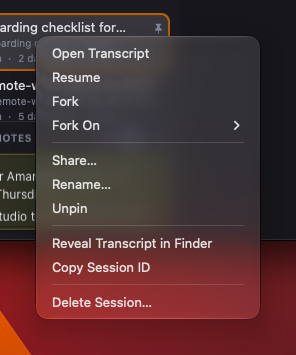
The same menu offers Open Transcript, Pin or Unpin, Reveal Transcript in Finder and Copy Session ID. See Pins and colours for pins.
Something wrong or missing? Tell us