 Cortex
Hand a session to another account or agent
Fork onto another account or agent and the new one picks up from the conversation so far.
A hand-off continues your work in a different account, or with a different agent, without retyping the background. You use it when your plan is running low, or when you want a second opinion from another agent.
How to hand off
- Open the session, as a transcript or as a running session.
- Press the small arrow beside Fork ⑂ in its header. Or right-click the session's row in the list and choose Fork On ▸.
- Pick the account. It can be another account of the same agent, or an account of another agent.
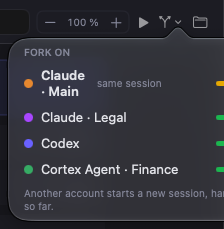
A new session starts there, in the context's folder, and is named after the original where the agent takes a name. The original session stays where it is. The account you picked becomes the one Fork uses next time. Resume or fork a session explains forks within an account.
When to use it
- Your plan is running low. The usage meters show it. Hand the session to the account with room.
- You want a second opinion. Hand a Claude Code session to Codex, or the other way round.
What the new session is given
The new agent does not share the old one's memory. Its first prompt is the conversation so far, condensed from the transcript by Cortex:
- Your prompts and the agent's answers are kept in full.
- Each tool call becomes one line, and sub-agent work becomes one line.
- Tool results and info lines are left out.
- It keeps the first prompt and then the newest turns, up to 60,000 characters. A line says how many turns were left out.
- It adds where the original session ran and where its transcript is.
Cortex never writes this prompt to its log.
Which account to pick
Hand-offs follow the same account order as every other list. Choose which account a session runs on explains the picker. To add the account you need first, see Use several accounts of one agent.
Something wrong or missing? Tell us