 Cortex
Close, keep running and quit
On this page
Closing a live tab, background sessions, what quitting asks.
Closing a tab, closing a session and quitting Cortex are different, and Cortex asks before it ends anything that is running. This article says what each does.
Close a live session's tab
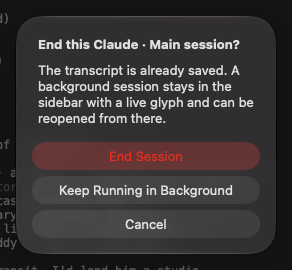
Press ⌘W on a live session. Cortex asks, for example, "End this Claude session?", naming the agent, with three choices:
- End Session ends the agent.
- Keep Running in Background closes the tab and lets the session carry on.
- Cancel leaves everything as it was.
The message says the transcript is already saved. Your conversation is never lost, because the agent writes it continuously.
Background sessions
A session you keep running has no tab, but it stays in the Context sessions list with a live glyph. Click its row to bring it back. It keeps working, and it still notifies you when it waits, as any session out of view does. See Notifications and the Waiting sheet.
Each context keeps at most five background sessions. At the limit the option is greyed and the dialog says so, so that a forgotten session is ended or reopened rather than piled up.
Close a terminal tab
⌘W on a terminal tab closes it without asking, and hangs up what it was running. A shell is yours to lose, at its tab. See Terminal tabs.
Close a file with unsaved changes
Cortex asks "Save changes before closing?" with Save, Don't Save and Cancel.
Quit
Press ⌘Q. If no session is live and no terminal is running, Cortex quits at once. Otherwise it asks, with a title such as "A session is still running", "3 sessions are still running", "A terminal is still open" or "2 sessions and a terminal are still open". The dialog lists each session by context and title, and each terminal by context, title and the command running in it. Choose Quit or Cancel.
Quitting hangs up everything and waits up to five seconds. Background sessions count, so you are not surprised by a live agent you forgot.
Unsaved files are saved first. If a save fails, Cortex asks "Could not save" and names the files. Cancel is the default, and Quit Anyway loses those changes.
If Cortex quits unexpectedly
If the app crashes, its terminals close and the agents exit. Nothing is lost except the terminal's scrollback, because transcripts are on disk. At the next launch, your layouts come back with transcript tabs where sessions were running.
A promise about other people's processes
Cortex never kills a process that is not demonstrably one it started. A job that survives the close, for example a command that detached itself completely, is left running rather than risk stopping someone else's work.
Something wrong or missing? Tell us