 Cortex
Views an agent puts in front of you
On this page
Forms, choices, tables and live boards on a tab, over the terminal or on the Stack, and how you answer.
Typing answers into a terminal is slow for some questions. With the Operator UI, an agent can put a native view in front of you: a form with fields, a choice between options, a table you select from, or a board it keeps updating while it works. You answer by clicking, and the agent gets your answer back as data.
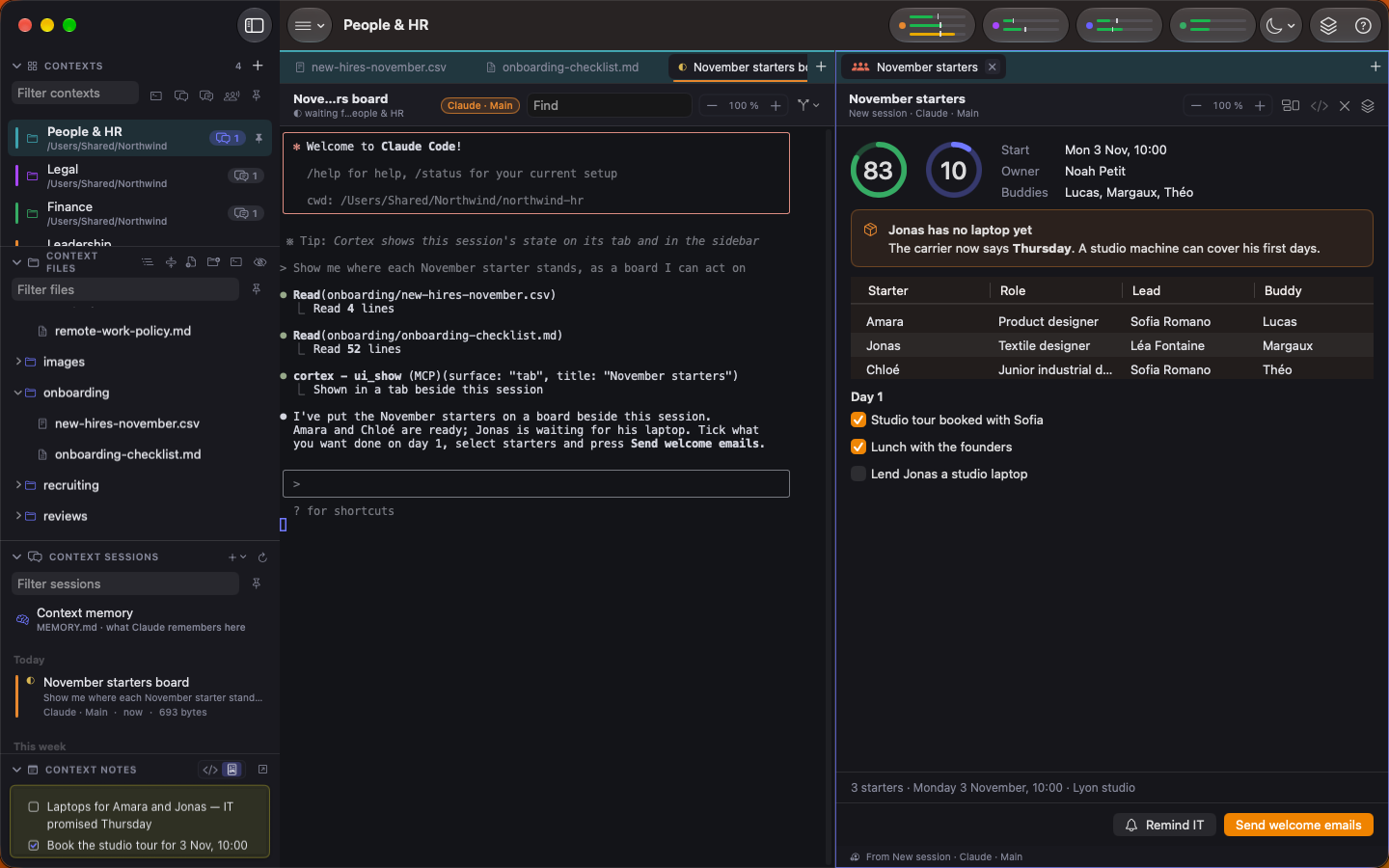
What a view can hold
Views are drawn natively in your theme, not as web pages. They can hold text and Markdown, text fields, text areas, toggles, pickers, multiple choices, sliders, steppers and date pickers, a field that chooses a file or folder, tables and lists you select from, charts, progress bars and gauges, code, a diff and links to files. An agent cannot give a view a raw colour, code of its own, or a picture from the internet.
Every view shows who asked, with the session's title, its agent and its account, and this line cannot be hidden.
Where a view appears
The agent chooses one of three places, within what Settings → MCP allows under Where views may appear:
- A tab. The default. A tab of the context opens in the group to the right of the session's group. Use it for forms and dashboards that stay.
- A card over the session. A short question, such as a confirmation or a choice, sits over the session's own tab. The terminal is dimmed beneath it and the other tabs stay usable.
- The Stack. A view you keep across contexts, such as a status board. See The Stack.
A view in a tab has a header with zoom, a View / Source switch (Source shows the view as read-only JSON, for debugging) and Add to Stack.
Answer a view
- Fill in the form or make your choice.
- Press the button that answers, such as Submit.
An agent can ask, which waits until you submit or cancel, or show a live view and read your clicks later. A live board is updated as the agent works, such as a progress line that becomes a table. Press Cancel or Esc on a card to decline. Required fields are checked before Submit accepts.
While an agent waits, its session shows ◉ and "Waiting for you" with the view's title. If Cortex is not in front, you get a notification. A click on it brings the view forward. The toolbar's Waiting button also lists the view, and you can answer it there. See Notifications and the Waiting sheet.
Buttons that start a prompt
A view's button can be set to type a prompt into the session's input line, for example "Deploy to staging". Cortex types it only when the session is idle at its prompt, and never presses Return. The text sits in the input line for you to read and send.
When the session ends
When the session's program exits, its views become read-only with "Session ended". Links and file chips still work. Views are not restored after a relaunch. A view on the Stack comes back as a read-only snapshot, "From an ended session".
Nothing an agent sends in a view is ever run. A view only shows things and returns your answers.
The tools behind these views, with every parameter, are in Tools reference: views.
Something wrong or missing? Tell us