 Cortex
Agents working with other sessions, rooms and minis
On this page
Status lines, conductor contexts, a second opinion, posting in a room, asking a mini.
A session can work with the rest of its context, not only alone. With Cortex's tools it can report what it is doing, start and read other sessions, post in a room of minis and ask a mini a question. Every one of these stays inside the session's own context, unless that context is a conductor.
See what each session is doing
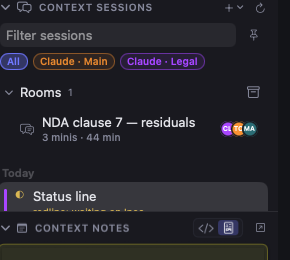
A session can set a one-line status, up to 80 characters, such as "tests 38/120" or "waiting on review". It shows on the session's tab, in its header and in the session list, and is cleared at your next prompt in that session. With four sessions running in parallel you can see who is doing what without opening each terminal.
Read the context's other sessions
A session can list the sessions of its own context, with their states and last lines, and read the condensed conversation of one: prompts, answers and tool names, but not the output of tools. When you come back to a context, you can ask a fresh session "where were we?" and it can summarise the last day.
Start another session
A session can start a new session in its context, with its own prompt, on an account of yours. It can start one on a different agent for a second opinion, for example asking Codex to review Claude's diff. It can read the answer when it is done. It can also pass on work when a plan runs dry: if its account is nearly out of headroom, it can write a summary and start a session on another account with it.
Starting a session runs a process, so Cortex asks you first, every time, with a card over the session showing the prompt and the account the new session would get. See What agents ask you before they act.
One conductor for several repositories
Normally a session sees only its own context. A context can be marked a conductor in Context Settings… with the switch Conductor — its sessions may start sessions in its extra roots. It is off by default. A conductor's sessions may then start, read, wait for and end sessions in the context's extra roots.
For a context that has several sibling repositories as extra roots, one session can split a change into one session per repository, each with its prompt, track their states on a board, and collect the answers. Cortex opens each extra root as a context of its own when a session first works there, once you have allowed that start. Everything else the session does stays bound to its own context, and each started session keeps the isolation of its own context. See Extra roots.
Rooms and minis
A session can list the rooms of its context, read a room's recent messages and post in it as itself. A mini that listens to everyone hears it and answers. Its message shows on the left of the chat with the terminal glyph and "· session". Posting sets minis talking, so Cortex asks you first each time, unless you allow it for that session.
A session can also ask a single mini a question and read the answer. The mini answers read-only, or, if it is bound to a context, as a session of that context. What a bound mini would ask you is put to you in a view over the asking session and in the Waiting sheet.
A session can propose a new mini, or a change to one, but it is shown to you whole and made only when you allow it. It can also create, archive or bring back a room and change its members, again each asked of you first. Deleting a room stays yours.
Each tool, with its parameters and what it asks you, is in Tools reference: sessions, rooms and minis and Tools reference: tasks.
Something wrong or missing? Tell us