 Cortex
What a context is
On this page
A folder in your list: what belongs to it and what Cortex never writes into it.
A context is a folder that Cortex lists in its sidebar. Almost everything in Cortex belongs to one: its files, its sessions, its open tabs, its colour and pins, its note and its memory.
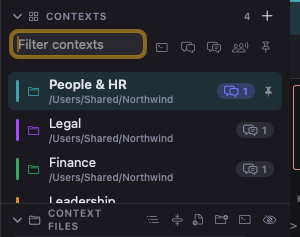
What makes a folder a context
A folder is a context when you put it on your list. You can make a new one with New Context…, add a folder you already have with Add Existing Folder… or by dropping it on the Contexts section, or pick folders in Find Contexts…. Cortex never adds or removes a context by itself, and a folder needs no marker to be one. Add your contexts shows each way, and Add, remove and organise contexts shows how to take one off.
The agent's marker folder, .claude/ for Claude Code or .codex/ for Codex, only lets Cortex propose a folder in Find Contexts… and in the welcome tour. A CLAUDE.md file alone is no marker, because drafts and planning folders often carry one too.
A context may also have extra roots: other folders that its sessions may work in. The context's own folder is its root. Extra roots explains how to add one.
What belongs to a context
When you open a context, the sidebar's lower sections swap to that context's own, and its tabs come back as you left them. The context holds:
- its files, in the file tree (The file tree),
- its sessions, from every account (Start a session),
- its rooms, meetings and tasks, listed under the sessions,
- its tabs and splits, saved per context, so switching loses nothing and live sessions keep running in the background,
- its note and the agent's memory (Context notes and memory),
- its colour, pins and settings (Pins and colours and Context Settings).
A context is identified by its folder's full path.
What Cortex never writes into it
Cortex keeps its own state, such as your list of contexts, layouts, accounts and each context's settings, in its own folder on your Mac. It never writes that state into a context's folder. Where Cortex keeps its files lists them.
What Cortex does write into a context is what you ask for: the note in NOTES.md, a file you create, an exported meeting, or a task's report in @outputs/. Your agents write there too, as they do outside Cortex.
A folder you rename or move
Contexts opened once
You can open a folder that is not on your list, from Finder or Terminal. Cortex lists it as "opened once". It stays until you quit, or until you keep it with Add to Contexts. See Open a folder, file or page from outside Cortex.
Something wrong or missing? Tell us