 Cortex
The Log and About
On this page
What the log records and never records, Copy and Clear, the version, the licence and the links to the terms.
Two places answer "what is Cortex doing, and what is it?": the Log pane in Settings, and the About Cortex view.
The Log
The log is a list of what the app did: every agent launch, the events agents reported, files that could not be read, and errors. It never records what an agent or you said. A session's words, its prompts and tool inputs never reach the log. A launch is logged without its first prompt or any token, and a notification is named by its session's title only.
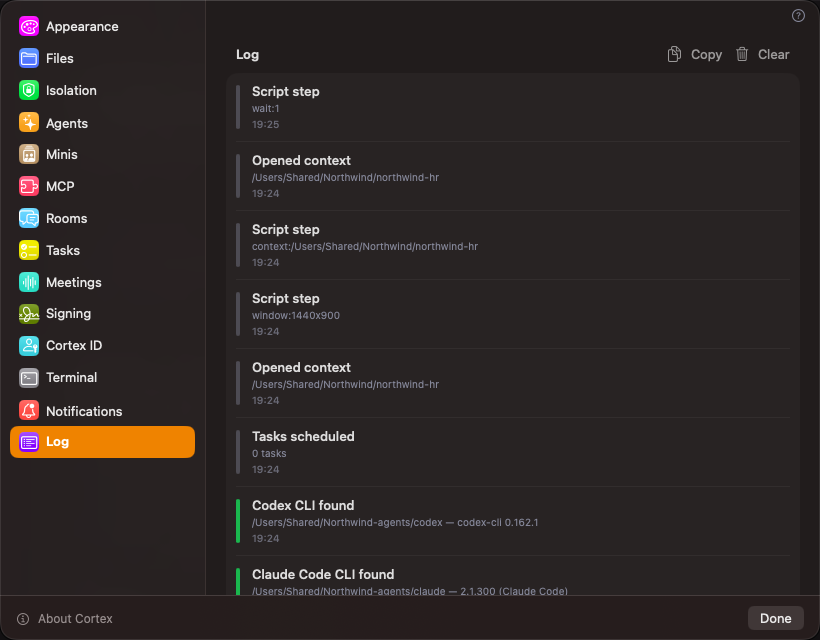
Each entry has a colour bar on its left, green for success, red for a failure and grey for information, a short title, details where there are some, and a time. The newest entry is first. Cortex keeps the latest 1,000 entries in memory, and the log starts empty each time Cortex launches.
- Copy puts the whole log on your clipboard as plain text, oldest first, with a time and a level on each line. Use it when you report a problem.
- Clear empties the list.
When something fails and no article says why, look here first. Entries such as "Link target not found" or "Not saved: changed on disk" name the cause in a few words.
About Cortex
Open it with the About Cortex button at the bottom left of Settings, or with Cortex → About Cortex in the menu bar. Both open the same view, as a sheet over the main window.
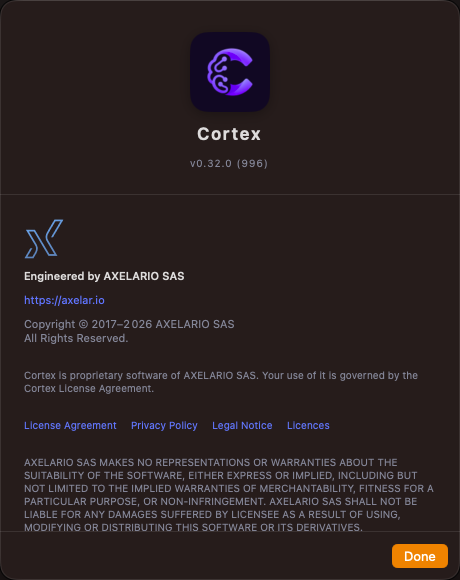
The logo, the name and the version stay at the top. The version comes from the build's release tag, so it is the number to give when you ask for help, for example 0.29.0. Below, you scroll through:
- the AXELARIO notice and its links: the License Agreement, which governs your use of Cortex, the Privacy Policy, the Legal Notice and Licences, which opens cortex.axelar.io/licences — every open-source component of Cortex and Cortex Server in one list, each marked App or Server, with its licence and notice. The same notices also ship inside the app's bundle;
- one line saying that Cortex is built on open-source software listed under Licences, and that the agents you use are separate products, launched as external programs, which Cortex does not include.
Each agent's own version is not here. It is on its row in Settings → Agents; see Which agents Cortex works with.
Something wrong or missing? Tell us