 Cortex
Decide who answers
On this page
Member order, turn order, moderator picks, mute, and the floor's budgets in Settings → Rooms.
In a room one mini speaks at a time, and each mini decides for itself whether it has something to say. The floor is the set of rules that decides who is asked, in what order, and when the room stops and waits for you.
What happens after your message
- Who may take a turn. The members, except the author of the message, muted minis, and minis whose Listens to setting excludes the author. A mini set to speak only when addressed takes a turn only when the message names it.
- In what order. Minis you named with
@go first, in the order you named them. The others follow in the room's member order. - One at a time. Each mini gets everything it has not seen yet, including what the minis before it said in this round, and either answers or passes.
- Follow-up rounds. When some mini spoke, another round starts from the last message with the same rules. Rounds stop when every candidate passes, or when the budget is reached.
A mini decides in the same call in which it answers: its whole reply is either an answer or a pass.
Choose the order
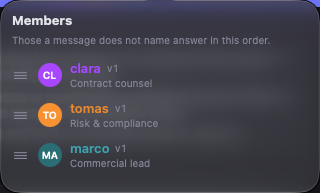
The Members button in the header opens a list of everyone in the room. Drag a row by its grip to change the order. The header faces, the author menu and the @ list follow it.
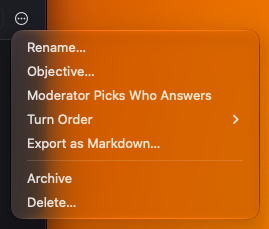
Open the room menu and choose Turn Order:
- As Listed is the default. Minis go in the member order.
- Who Spoke Longest Ago First asks the mini that has been quiet longest first. A mini that never spoke counts as longest ago.
Let a moderator pick
Choose Moderator Picks Who Answers in the room menu. At the start of each round a quick call to an agent reads the new message and a few before it, and picks who should answer, most relevant first, possibly nobody. The chat says "The moderator is choosing who answers…" while it works.
Minis you named still go first, whatever the moderator says. After them only the minis the moderator picked answer. The moderator runs on the engine you set for Moderate with in Settings → Minis, or on the Reshape with engine if you chose none. A small local model works well, since it is called before every round. When a message waits for you, for an approval or an answer, the moderator can hand the floor back to you and the room waits. If its call fails or says nothing readable, that round falls back to the normal rules, with a line in the log.
Mute a mini
Click a mini's face and choose Mute. It stays in the room but takes no turns and sees nothing new. When you unmute it, it catches up on what it missed.
Set the budget
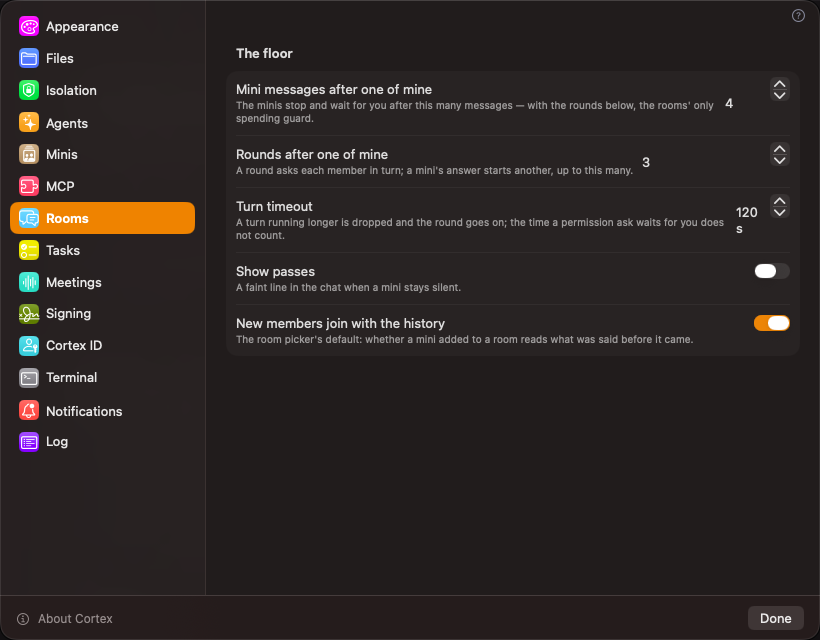
The budget stops the minis from talking forever. Set it in Settings → Rooms:
| Setting | Default | Range |
|---|---|---|
| Mini messages after one of mine | 4 | 1 to 20 |
| Rounds after one of mine | 3 | 1 to 10 |
| Turn timeout | 120 s | 10 to 600 s |
| Show passes | off | |
| New members join with the history | on |
When the room reaches the budget, a line says "The minis are waiting for you". A turn that runs longer than the timeout is dropped and the round goes on. The time a mini spends waiting for your permission does not count.
Something wrong or missing? Tell us