 Cortex
Keep, stack, export and archive rooms
On this page
Past rooms in the sidebar, a room on the Stack, export as Markdown, archive and delete.
A room outlives its tab. Cortex keeps every room and its log in its own data, and lists the rooms of each context in the sidebar.
Find a past room
In the sidebar's session list, a Rooms row shows the number of rooms the context has. Click it to fold or unfold the list. Each room shows its title, how many minis it has, its last activity and its members' faces. Click a room to open it. The filter field filters rooms by title, and Quick open (⌘P) finds rooms in every context.
A room's menu in the list has Open, Rename…, Archive or Unarchive, and Delete….
When you reopen a room, its minis pick up where they left off. If a mini's own session is gone, Cortex starts a new one and gives it the room's history again.
Keep a room in view on the Stack
A room can sit on the Stack, the panel on the right, so that you keep an eye on it while you work in another context. Drag the room's tab to the Stack, or choose Add to Stack from the tab's menu, or press ⌘⌥S.
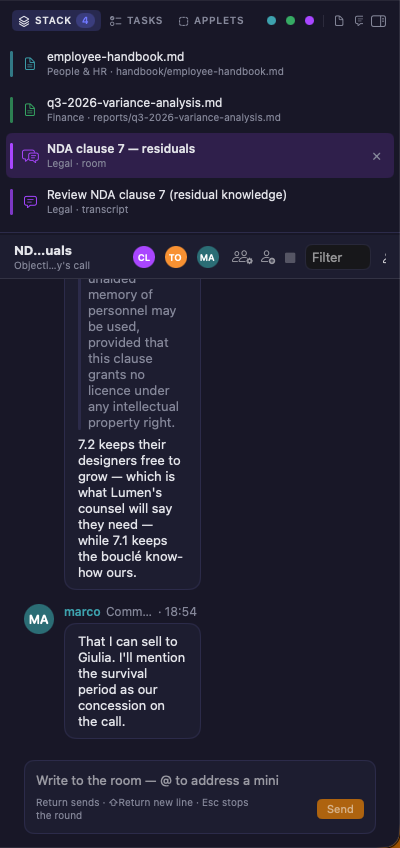
On the Stack a room is exactly as active as in a tab: the composer, Add Mini…, the member and room menus, Stop, Quote, Delete… and the permission cards all work. A round that is running keeps going when you move the room. The room's header gains Open in context, which opens it as a tab in its context. Rename… there asks for the name in a field.
Export a room as Markdown
Open the room menu and choose Export as Markdown…. A Save panel names the file. The export leaves out passes and shows the room's own lines, such as who joined, in italics. Messages you deleted are not included.
Archive a room
Choose Archive in the room menu or in its list menu. The room leaves the list of open rooms but is kept whole, with its log and its members. An archive toggle appears on the Rooms row, only when there are archived rooms, to show them dimmed. Unarchive brings one back. An open tab stays open when you archive its room.
Delete a room
Choose Delete… and confirm. The room's tab closes and its files go to the Trash.
Share it
You can send a room's conversation to other people as a read-only package, with secrets and paths outside its context redacted first. Right-click the room in the sidebar or its tab and choose Share…. You need a Cortex ID. Send it to email addresses, whether or not the people have Cortex, or as a public link anyone can open. See Share a session, room, meeting or task and Sharing, in short.
Something wrong or missing? Tell us