 Cortex
Schedule a task
On this page
Now, once at a time, or repeating; missed runs, sleep, pausing and clock changes.
The editor's Schedule control has three choices: Now, Once at and Repeat. Cortex is the scheduler, so scheduled tasks run while Cortex is running.
Now
The task runs when you press Run Now, and any time later when you press it again. Until then it is a draft.
Once at
Pick a date and time, in your local time. A time that has already passed is refused ("That time has passed"). After its run the task stays, with its result, until you archive it. Running a task by hand with Run Now does not use up its time: it still runs at its time.
Repeat
Choose how often from the dropdowns. You never have to type a schedule.
- In Repeats choose every few minutes (5, 10, 15, 20 or 30), every few hours, every day, every week or every month.
- Set the rest: for a week, toggle the days (the buttons Weekdays, Weekends and Every day are quick choices); for a month, a day from 1 to 31 (a month without that day is skipped).
- Set the time in At, in steps of five minutes.
- Choose when it Ends: never (the default), on a date or after a number of runs. Every run that started counts, including those you start by hand.
The editor shows the schedule in words, such as "Mon, Wed, Fri at 09:00", and lists the next five runs.
For something the dropdowns cannot say, choose Custom (cron expression) at the end of Repeats and type a five-field cron expression. A schedule that never fires, or fires more often than every 5 minutes, is refused.
What happens when runs collide
- One run at a time per task. A run due while the last is still going is skipped, with a line in the runs list.
- Several tasks at once. At most two runs go at the same time by default. The others wait, queued. Change this with Concurrent runs in Settings → Tasks.
If your Mac was asleep or Cortex was closed
Cortex cannot wake a sleeping Mac. It finds runs that fell due while it was not running and decides at launch and when the Mac wakes. Each task has an If missed choice:
- Run once is the default. One run starts now, however many were missed, and the worker is told when the run was due.
- Skip adds a missed line and runs nothing.
A once at task always runs once when missed. While a run is going, Cortex keeps your Mac awake, but not the display.
If you quit with runs going, Cortex asks first. Stop and Quit stops them, each asked for its report, and quits. A run cut off then shows as failed at the next launch.
Pause
Choose Pause Schedule in a task's menu to stop it starting by schedule. Run Now still works, and on Resume Schedule what fell due meanwhile is not caught up. Pause all tasks in Settings → Tasks pauses every task. Archived tasks plan nothing either.
Clock changes
Cortex uses your local wall-clock time. A time that a clock change skips runs at the next minute that exists. A time that it repeats runs once.
Defaults in Settings
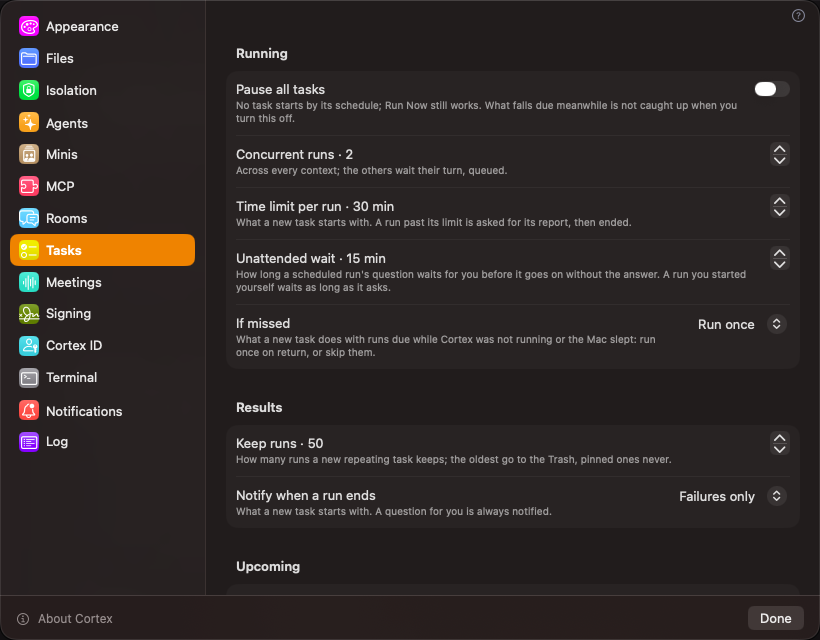
Settings → Tasks holds the defaults new tasks start from: time limit per run (30 minutes), If missed, Keep runs (50) and Notify when a run ends. It also shows the next ten runs across every context. Unattended wait is how long a scheduled run's question waits for you. See Answer a task and read its report.
Something wrong or missing? Tell us