 Cortex
Contacts and groups
Cortex remembers who you exchange with, suggests them while you type, and keeps groups.
Every share and every listed mini asks for email addresses. Cortex remembers the people you exchange with, so you type an address once and pick it from then on. The contact book stays on your Mac. It is never sent to the server and never written into a context folder.
How Cortex learns people
Learning is automatic. A person is learned from what you send and receive:
- every address of a share you send, a recipient you add later, and an invitation you send again;
- every address a mini of yours is listed for;
- the sender of every share sent to you, the owner of every mini listed for you, and everyone who asks to talk to a mini of yours.
An address you only typed teaches nothing: if a send fails or you cancel, nobody is learned. A public link has no address, so it teaches nothing either. When several of someone's addresses reach the same Cortex ID, Cortex merges them into one person. It never merges on a name or on a similar-looking address.
Type and pick
Wherever Cortex asks for addresses, one field takes them: the Share sheet, Add people in a share's Manage… popover, and the addresses of List a Mini….
- Start typing a name or an address. From the first letter, a list offers up to six contacts or groups.
- Each row shows the person's name, the address Cortex would use, the key's mark (Verified in green, Key changed in orange) and how many shares went each way.
- Press ↑ or ↓ to move and Return, Tab or a click to pick. Esc closes the list and keeps your text.

Suggestions are ranked by how often and how recently you exchanged, with older exchanges counting half as much every 30 days. A person with several addresses uses the one you last sent to. Click the token to choose another.
Groups
With two or more people in the field, a line under it offers Save these N as a group…. Name the group and choose Save. From then on, typing the group's name adds all of its people. A group is only a shortcut: a share reaches addresses, never a group, and recipients never see the group or its name.
The Contacts sheet
Choose Contacts… in the ≡ workspace menu at the top left of the toolbar. It works with or without a Cortex ID.
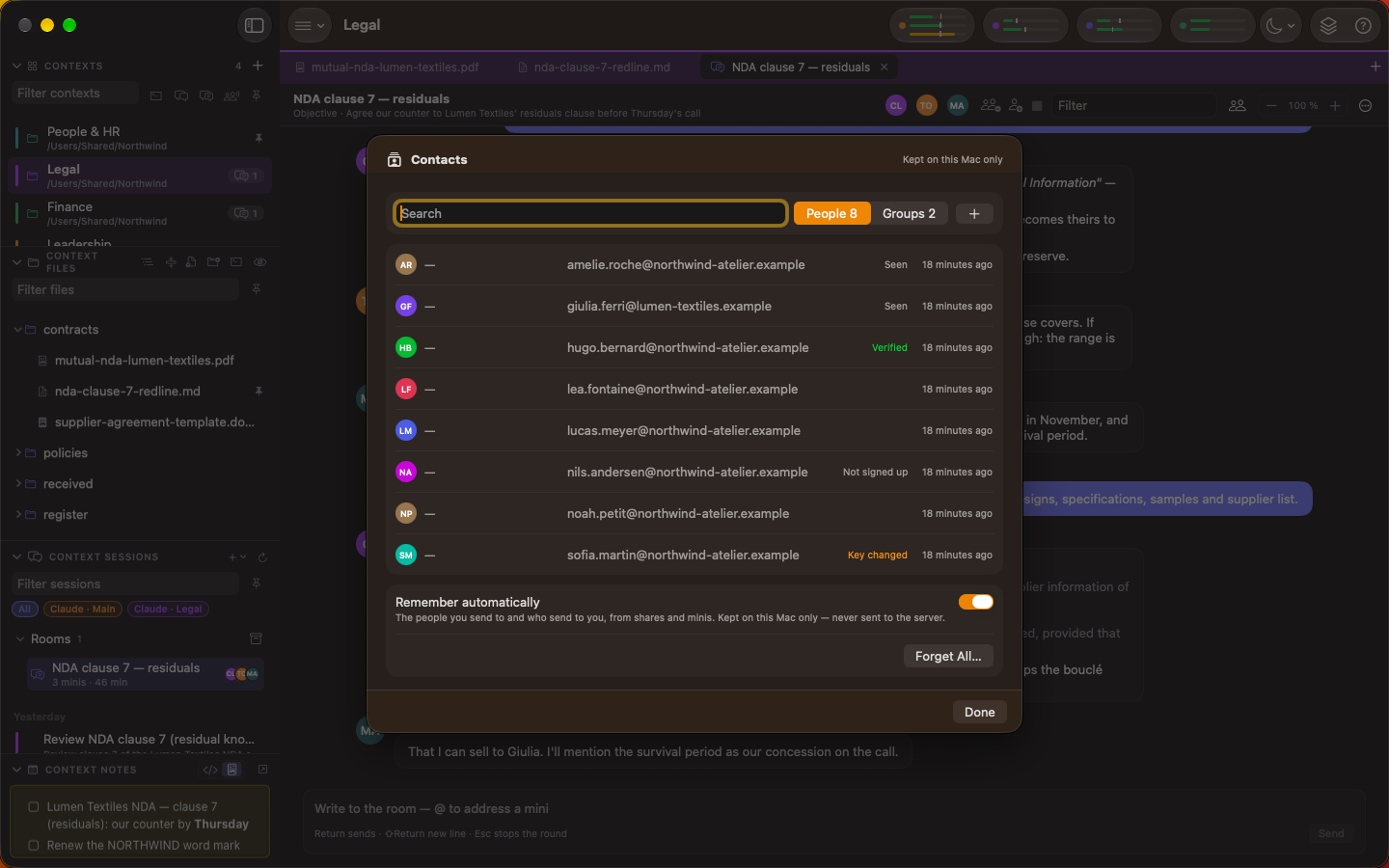
- People lists everyone with the state of their key and the last exchange. Select a person to Edit… their name and addresses, Compare Fingerprint… (see Verify who you share with), see their groups, or Forget them.
- Groups lists your groups. Select one to add or remove people, Rename… or Delete Group…. Deleting a group never forgets its people.
- The + button adds a person or a group by hand.
- At the foot, Remember automatically is on by default, with the note that it is kept on this Mac only and never sent to the server. Forget All… empties the book after asking.
If you switch Remember automatically off, nobody new is learned, and nobody already learned is removed. Switching it on again learns what you exchanged meanwhile.
What stays
Leaving your Cortex ID or choosing Forget This Mac keeps the contact book. A contact you forget is learned again if you exchange with them again.
Something wrong or missing? Tell us